
simpleTapeStop
Key Features
- Slow audio to a stop and spin it back up with separate timing controls.
- Shape the braking and acceleration with an adjustable curve.
- Sync timing to musical divisions from 1/32 to four bars.
- Trigger the effect with the Stop button, host automation, or a held MIDI note.
- Reverse approximately the most recent ten seconds of audio for transitions and fills.
- Pass audio through unchanged at normal speed with latency reported to the host.
Description
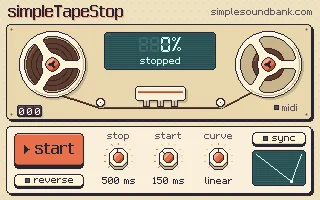
simpleTapeStop is a tape stop and reverse effect from simpleSoundbank that slows incoming audio to a halt and brings it back up to speed. Use it on a single track, a bus, or a master channel to create transitions and interruptions without editing the source audio.
Separate stop and start times run up to eight seconds, while a curve control shapes the movement from a gradual drift to a harder brake. Sync switches timing to musical divisions from 1/32 to four bars, making it easier to place the effect within an arrangement.
Click the Stop control, automate its parameter, or hold a MIDI note in a host that routes MIDI to effects. Releasing the control starts the tape again, so a slowdown and return can form one performance gesture.
Reverse changes the direction of the effect and plays back approximately the last ten seconds of audio. If held beyond that buffer, the output falls silent until the trigger is released, a useful limit to know when planning longer transitions.
At normal speed the effect passes audio through unchanged and reports eight samples of latency to the host. The developer also provides an interactive browser version for trying the controls before installing the plugin.
Frequently Asked Questions
How do I trigger the tape stop with MIDI?
Route MIDI notes to the track containing the effect. The tape stops or reverses while a note is held and resumes when it is released; in Ableton Live, the developer recommends automating Stop instead.
How long can the reverse effect play?
Reverse uses approximately the last ten seconds of audio. If you hold it longer, the output falls silent until you release the trigger.
Does the plugin color audio when the tape is running normally?
The developer says the signal passes through unchanged at full speed. It reports eight samples of latency to the host.
Can I try the effect before installing it?
Yes. The product page includes an interactive browser version with working controls, using the plugin’s tape engine compiled for the web.


