
Panipulator
Key Features
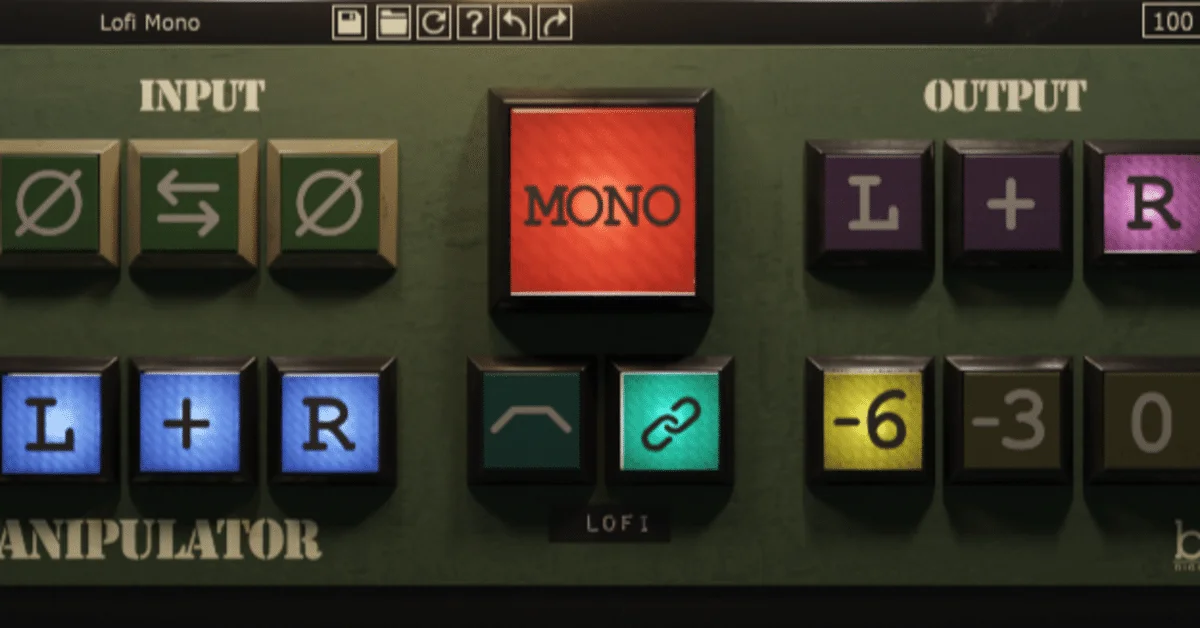
- One-click mono summing helps reveal elements or balances that disappear when a stereo mix is folded down.
- Selectable 0, -3, and -6 dB pan-law options support level-aware mono comparisons.
- Independent left and right polarity flips help trace phase-related issues in stereo or multi-miked sources.
- Left/right isolation can be auditioned in stereo or mono to check channel-specific playback behavior.
- Stereo-field reversal makes it easy to compare how a mix responds when channel positions are swapped.
- LoFi mode provides an intentionally restricted listening perspective for quick translation checks.
- The compact, CPU-friendly interface is designed for fast master-bus monitoring rather than elaborate processing.
Description
Panipulator is Boz Digital Labs’ mix-translation utility for checking what a stereo mix does when it meets mono or imperfect playback. Place it on a mix or monitoring path to sum channels, isolate the left or right side, reverse the stereo field, and expose polarity problems before a release reaches phones, public-address systems, or uneven speaker setups.
The central Mono control is paired with selectable 0, -3, and -6 dB pan-law compensation, so you can compare a mono fold-down without confusing the level change for a tonal change. Individual left and right polarity switches make it practical to investigate phase-related cancellations in multi-miked material or stereo processing.
Panipulator also provides left/right isolation in stereo or mono, plus a LoFi listening mode for a deliberately restricted playback perspective. The compact, one-click layout favors quick checks on a master bus over detailed stereo-field editing, so it works best as a monitor-and-diagnose utility rather than as a widening processor.
Boz lists Panipulator at $0.00 as a permanent free product rather than a time-limited promotion. Getting the installer requires a $0 checkout and developer account registration, after which the product page’s workflow supplies the download and serial details.
Video Preview

Frequently Asked Questions
What does Panipulator do?
Panipulator is a monitoring and mix-translation utility. It can sum a stereo signal to mono, isolate channels, reverse left and right, and invert either channel’s polarity so you can identify translation and phase problems.
Why does Panipulator offer 0, -3, and -6 dB mono modes?
Summing correlated left and right signals can raise the apparent level. The mode choices provide pan-law compensation so the comparison can be judged without mistaking a gain increase for a change in tone or balance.
Can Panipulator help find phase problems?
Yes. Its individual left and right polarity controls and mono summing are intended to reveal cancellations or level changes that may be hidden in a stereo presentation, including in multi-miked material.
How do I get Panipulator?
Boz Digital Labs lists the product at $0.00 on its product page. Add it to the cart and complete the $0 checkout; this requires a developer account and supplies the installer and serial details.


