THD Meter
Key Features
- Measures total harmonic distortion in sound cards, speakers, and headphones from inside a compatible DAW.
- Uses matched filtering to improve signal-to-noise performance when measuring noisy systems.
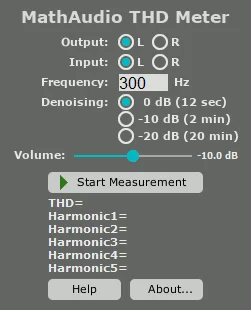
- Provides a selectable 20 Hz to 10 kHz test tone, separate left/right channel selection, and input routing controls.
- Offers denoising settings that trade a longer measurement period for lower THD error.
- Loads microphone calibration files in .frd, .cal, and .txt formats for speaker and headphone measurement.
- Works across 44.1 kHz to 384 kHz sample rates without resampling and includes a resizable, 4K-aware interface.
- Supports VST, VST3, and CLAP on Windows plus AU, VST, VST3, and CLAP on macOS.
Description
THD Meter is a MathAudio analysis plug-in for measuring total harmonic distortion in sound cards, speakers, and headphones. It generates a test tone, measures one channel at a time, and reports the result after a defined measurement interval, making it a focused utility for checking an audio chain rather than shaping a mix.
Matched filters help improve signal-to-noise performance when the measured system has additive noise. You can choose a test frequency from 20 Hz to 10 kHz, set the output channel and input source, and increase denoising when you need a longer, more precise measurement.
The plug-in accepts microphone calibration files in .frd, .cal, and .txt formats for speaker and headphone checks. MathAudio also supports sample rates from 44.1 kHz through 384 kHz without resampling, so the test can follow the highest rate supported by the audio interface.
This is best treated as a practical diagnostic tool: first establish the sound card's own distortion with a line-out-to-line-in loopback, then use a microphone path to investigate speakers or headphones. The current release adds CLAP support alongside the established VST, VST3, and AU builds.
Frequently Asked Questions
What does THD Meter measure?
THD Meter measures total harmonic distortion in a sound card, speaker, or headphone setup. It is an analysis utility, so it generates and measures a test signal rather than processing music for creative effect.
How do I test an audio interface with THD Meter?
MathAudio recommends connecting the interface line output to its line input with an audio cable, then inserting the plug-in in an otherwise empty stereo project. Check the interface first so its own distortion can be separated from the result when measuring speakers or headphones.
Why would I use the denoising options?
Denoising is intended for measurements where the sound card, microphone, or room noise makes very small distortion values difficult to resolve. The stronger options take longer, so use them when precision matters more than speed.
Can THD Meter use a microphone calibration file?
Yes. The official instructions list .frd, .cal, and .txt calibration files; place one supported file in the MathAudio THD Meter documents folder and restart the DAW. Calibration is for microphone-based speaker or headphone tests, not sound-card loopback measurement.