
Key Features
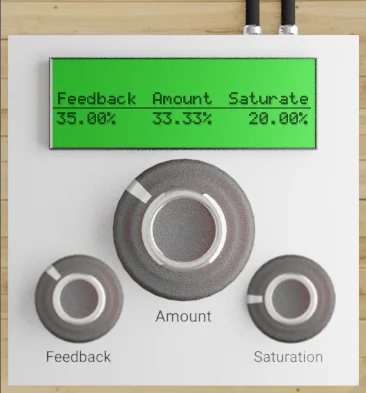
- Create stereo width using a doubled signal
- Blend the doubled signal with the Amount control
- Adjust the tail of the doubled signal with Feedback
- Add saturation to the input and output signals
- Work with three controls in a compact interface
Description
GDoubler by SNFK Music is a stereo doubling effect designed to add width to a mix. Its compact set of controls lets you balance the doubled signal, adjust its tail and add saturation.
The Amount knob controls the mix of the doubled signal, giving you a direct way to decide how prominent the widening effect is. The Feedback control changes how much of a tail the doubled signal has, so you can adjust the effect beyond its initial contribution.
A separate Saturation control affects the input and output signals for a warmer character. With all three parameters on one small interface, GDoubler is suited to a straightforward widening workflow when you want to make a quick adjustment by ear.
SNFK describes the plugin as lightweight on CPU, which makes it worth considering when session resources are limited. As with any stereo effect, compare the processed signal in context and check how it translates in mono before settling on a setting.
The developer's release post provides a Windows VST3 attachment and states that only Windows was supported at release. Plugins4Free lists a 64-bit Windows version; the developer does not specify a minimum Windows version on the release post.
Frequently Asked Questions
What does the Amount control do?
It controls the mix of the doubled signal. Adjust it to balance the doubling against the input.
How does Feedback change the sound?
Feedback controls how much of a tail the doubled signal has. Adjust it alongside Amount to find a useful balance in the mix.
Where can I get GDoubler?
The developer’s GDoubler post contains a VST3 attachment. The post is publicly viewable and identifies the plugin as free.


