

Key Features
- Reverse incoming audio in chunks to create unusual delay textures.
- Set chunk size with the Time control.
- Adjust crossfades between chunks for smoother or more abrupt transitions.
- Balance original and processed audio with separate Dry and Effect controls.
- Use the fully wet signal for isolated reverse processing.
- Combine instances or pair with conventional delays to create layered effects.
Description
GRevDly by GVST is a reverse delay effect that breaks incoming audio into short chunks and plays those chunks backwards. It can turn a straightforward part into a shifting sequence of reversed fragments while leaving the original signal available alongside it.
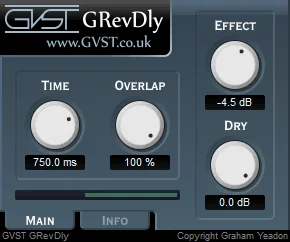
The Time control sets the size of the chunks, while Overlap adjusts the crossfades between them. Longer crossfades can smooth the joins; shorter ones make transitions more abrupt, giving you a way to shape the character of the effect.
Separate Dry and Effect controls set the levels of the original and processed signals. Blend them for a forward performance with reversed echoes, or turn the dry signal down and use an entirely wet output when you want to hear only the transformed material.
The interface has four knobs with editable readouts and a visual illustration of the process. That compact layout makes it straightforward to explore how changing chunk size and overlap affects the result without navigating a large effects rack.
GVST suggests combining multiple instances or pairing GRevDly with a conventional delay to build a wash of sound. The developer offers VST downloads for Windows, Mac OS and Linux; choose the appropriate version for your host on the download page.
Frequently Asked Questions
How does GRevDly reverse audio in real time?
It divides the incoming audio into chunks and plays those chunks in reverse. Time sets their size, and Overlap controls the crossfades between them.
Can I hear only the reversed signal?
Yes. Set Effect to 100% and Dry to 0% for an entirely wet signal, as suggested in the developer manual.
Which systems does GRevDly support?
GVST lists VST downloads for Windows, Mac OS and Linux. The selection page offers 32-bit and 64-bit Windows and Linux builds and a Mac build that includes Silicon support.
Can I layer GRevDly with other delays?
Yes. GVST suggests using multiple instances in series or combining it with a conventional delay to create a wash of sound.


