

Key Features
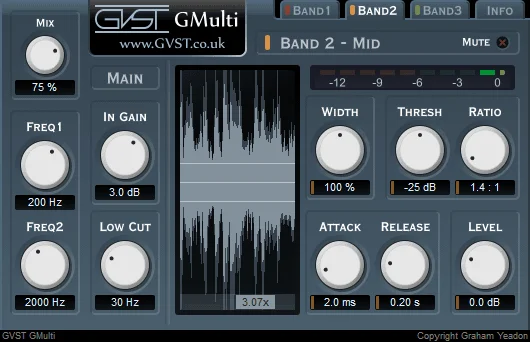
- Split audio into three bands using two adjustable crossover frequencies.
- Set compression threshold, ratio, attack and release independently for each band.
- Adjust stereo width and output level separately across the low, middle and high bands.
- Mute bands to audition frequency ranges while adjusting settings.
- Compare input and output waveforms and monitor gain reduction for each band.
- Blend dry and processed audio with the Mix control and apply an optional low-cut filter.
Description
GMulti is a three-band compressor from GVST that combines frequency-specific dynamics control with stereo width adjustment. It splits incoming audio at two adjustable crossover frequencies, allowing the low, middle and high bands to be processed independently.
Each band has threshold, ratio, attack and release controls, plus its own level and width settings. You can mute bands to hear the others in isolation, then blend the processed signal with the original using the global Mix control.
A waveform display compares the signal before and after processing, and separate gain-reduction meters show how much compression is applied to each band. These visual aids can help when balancing a bass-heavy guitar part or controlling different parts of a mix without applying the same dynamics settings across the whole spectrum.
The low-cut control provides an additional high-pass filter before compression. GVST also suggests narrowing the bass band to centre low-frequency stereo information while leaving room to adjust the width of the other bands.
GMulti is a VST effect, so it needs a compatible plugin host and processes existing audio rather than generating sound. GVST offers Windows, macOS and Linux downloads, including Apple Silicon support for the Mac version; check your host’s VST compatibility before installing.
Frequently Asked Questions
What does GMulti do?
GMulti divides audio into three frequency bands and compresses each one independently. It also provides per-band stereo width and level controls.
Can GMulti narrow the stereo image of bass frequencies?
Yes. GVST suggests using the width control on the bass band to centre its stereo image, while adjusting the other bands separately.
How can I hear the compression on one band?
Mute the other bands to isolate the range you want to check. The waveform display and gain-reduction meters also provide visual feedback.
Which systems support GMulti?
GVST lists VST downloads for Windows, macOS and Linux, including a Mac build for Apple Silicon. A compatible VST host is required.


