
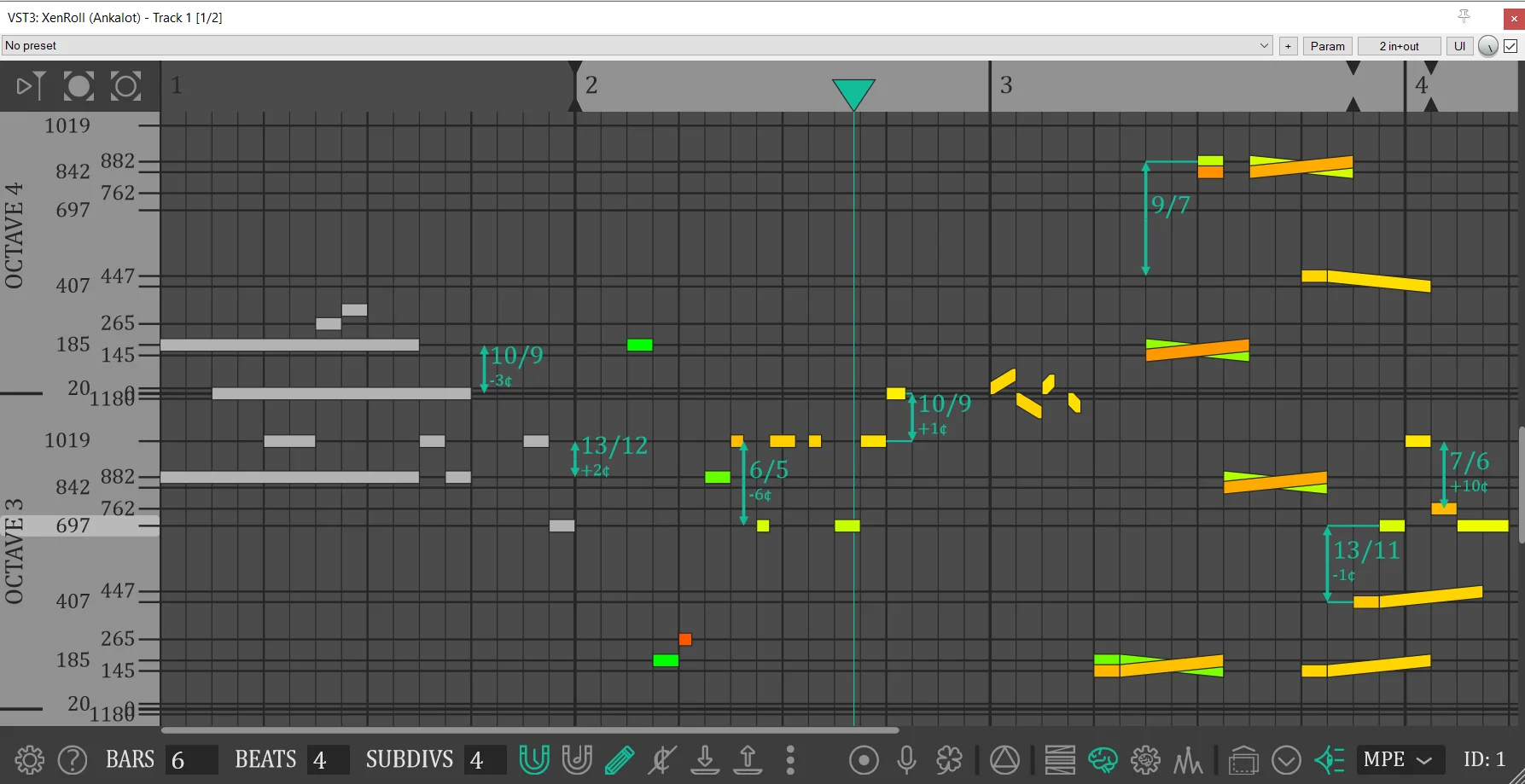
XenRoll
Key Features
- Microtonal piano-roll editing with one-cent pitch placement across a 1200-EDO pitch grid.
- Visible independent note bends for writing pitch curves and non-12-TET melodic movement directly on the timeline.
- Pitch-memory, tonality, stability, consonance, and dissonance visualizations for experimental harmonic decisions.
- Real-time singing or humming input can generate notes and pitch curves for faster sketching.
- MPE and MTS-ESP tuning modes let XenRoll drive compatible synths and samplers rather than generating sound internally.
- Multiple DAW instances can show ghost notes from each other, helping layered microtonal parts stay coordinated.
- Current VST3 release assets cover Windows, Linux, macOS Apple Silicon, and macOS Intel.
Description
XenRoll is a VST3 piano-roll plugin for composing xenharmonic and microtonal MIDI parts inside a DAW. Instead of treating pitch as fixed semitone steps, it lets notes land at one-cent precision across a 1200-EDO grid and makes independent pitch bends visible on the timeline.
The workflow is built for composers who need to see tuning decisions as part of the musical structure. XenRoll can show a real-time clock diagram for notes, intervals, and chords, display pitch-memory and dissonance visualizations, and keep ghost notes from other plugin instances visible across a project.
It is not a sound generator by itself, so the intended setup is to place a synth or sampler after XenRoll in the track chain. Tuning is handled through MPE or MTS-ESP master mode, with the README documenting different requirements for each mode and listing tested instruments such as Surge XT, Serum, Pianoteq, Vital, and Diva.
The current GitHub release provides VST3 ZIP builds for Windows, Linux, macOS Apple Silicon, and macOS Intel. The project is open source under GPL-3.0, and no source or official page reviewed here shows a countdown, coupon, launch-only offer, checkout requirement, or paid tier for the plugin.
Frequently Asked Questions
Does XenRoll generate sound on its own?
No. The README says XenRoll is intended to sit inside a DAW before a synth or sampler in the track's FX chain. It sends tuned MIDI control, while the instrument after it produces the audio.
What tuning methods does XenRoll use?
XenRoll supports MPE and MTS-ESP, with MPE selected by default. The README notes that the tuning mode is shared by all XenRoll instances in a project and that projects need to be saved and reopened after changing it.
Why would I use XenRoll instead of a normal DAW piano roll?
A normal piano roll is usually built around 12-EDO semitone steps, while XenRoll lets notes sit at one-cent resolution and shows bends directly. That makes it more practical for xenharmonic melodies, custom intervals, and pitch curves.
Which instruments are known to work with it?
The README lists tested examples including Surge XT, Serum, Serum 2, Pianoteq, Shortcircuit XT, Junior, Vital, and Diva. Compatibility depends on whether the downstream instrument supports the selected MPE or MTS-ESP workflow.


