
Waveform Compressor
Key Features
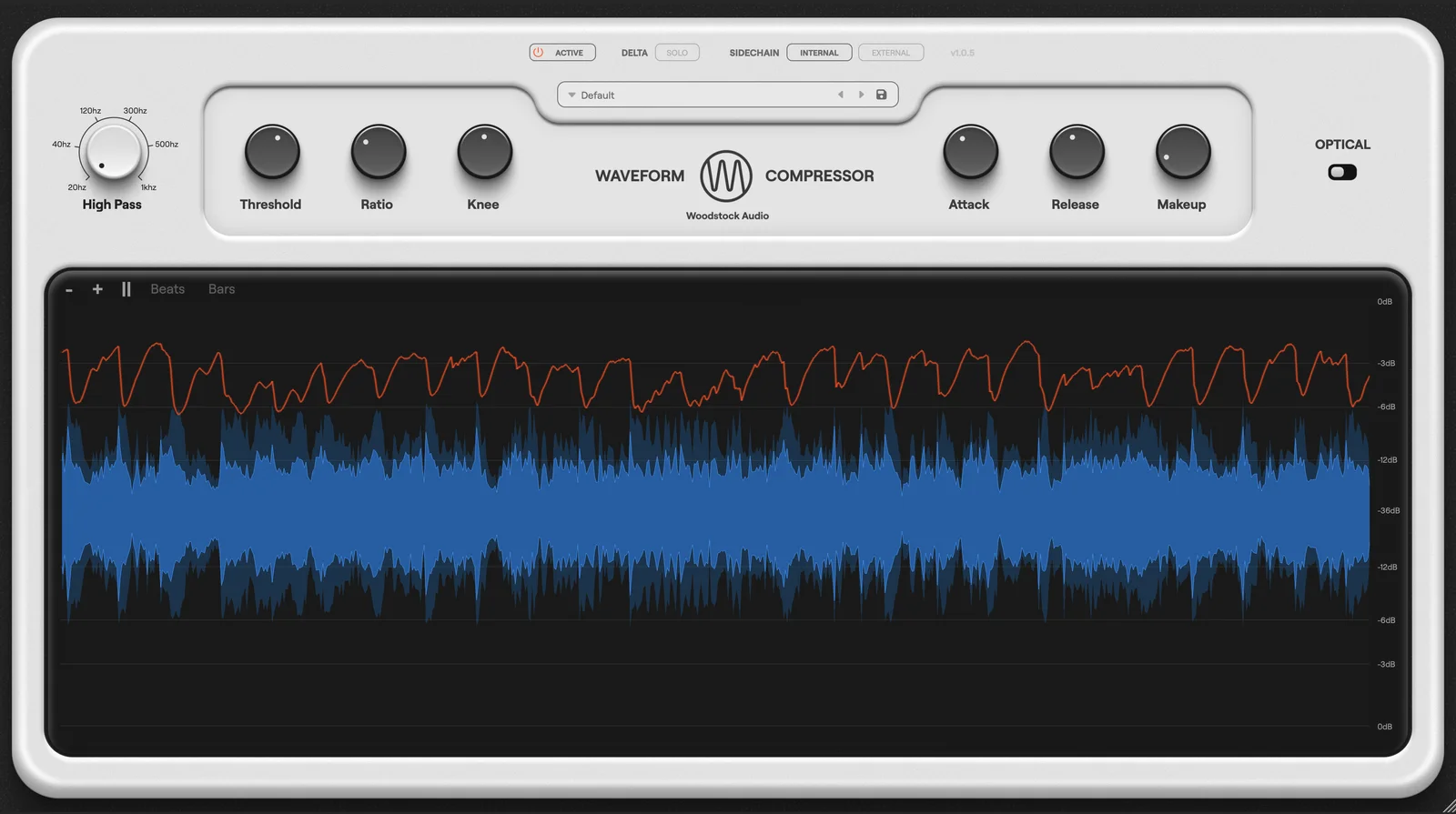
- Before-and-after waveform display, gain reduction line, and moving threshold line make compressor behavior visually readable instead of relying on meters alone
- Regular mode gives you a feedforward peak-compression workflow with threshold, ratio, attack, release, knee, and detector high-pass filtering for everyday mixing tasks
- Optical mode swaps in a more adaptive program-dependent response that is better suited to smoother vocal, bass, and leveling duties
- Delta Solo lets you monitor only what the compressor is removing, which makes it easier to judge transient loss and over-compression
- External sidechain support plus detector filtering extends the plugin beyond beginner training use into bus compression and ducking workflows
- Built-in presets, zoomable GPU-powered graphics, pause, and dynamic window resizing keep the workflow fast while still offering detailed feedback
Description
Waveform Compressor is a dynamics plugin from Woodstock Audio built to make compression easier to understand while still being useful in real sessions. Instead of giving you only meters and your ears, it overlays before-and-after waveforms, gain reduction, and threshold information so you can see how attack, release, and threshold choices are reshaping a signal.
Under the hood, it is more flexible than the beginner-friendly presentation first suggests. Regular mode behaves like a feedforward peak compressor with threshold, ratio, attack, release, knee, detector high-pass filtering, and external sidechain support, while Optical mode switches to a more adaptive two-stage release character that suits vocals, bass, and smoother leveling jobs.
The educational angle is backed up by features that matter in practice. Delta Solo lets you hear only what the compressor is removing, the visualizer can zoom and pause for closer inspection, and the included presets cover several classic compressor-style starting points without forcing you into one fixed workflow.
The official Woodstock Audio page still lists the plugin at $0.00, and the FAQ states that Waveform Compressor does not require activation. Downloading is not a plain public file link, though: Woodstock Audio delivers the installers after a free checkout flow that asks for your email, name, and address before showing the download on the confirmation page and in the order email.
Video Preview


Frequently Asked Questions
What makes Waveform Compressor different from a typical free compressor?
Its standout feature is the large waveform visualizer that shows the signal before and after compression along with gain reduction and threshold information. That makes it easier to connect what you hear with what the compressor is actually doing, which is especially useful when learning attack, release, and threshold behavior.
What changes when you switch to Optical mode?
Regular mode behaves like a feedforward peak compressor with conventional timing controls, while Optical mode moves to a more adaptive response with a two-stage release and program-dependent behavior. The result is a smoother, more organic feel that fits vocals, bass, and gentler leveling better than the default mode.
Does Waveform Compressor require activation or an iLok account?
No. Woodstock Audio's FAQ explicitly says Waveform Compressor does not require activation, and the product page also states that there is no license or activation step after installation.
How do you actually get the download if the plugin is free?
Woodstock Audio distributes it through a free checkout rather than a public direct-download button. You add the plugin to the cart, complete checkout with your email, name, and address, and then the installer links appear on the confirmation page and in the follow-up email.
Is this mainly a teaching tool, or is it useful in serious sessions too?
It is clearly designed to help users understand compression, but the feature set goes beyond a stripped-down demo utility. External sidechain support, detector filtering, presets, Delta Solo, and the choice between Regular and Optical behavior make it usable for everyday mixing tasks as well.


