
Texture Loom
Key Features
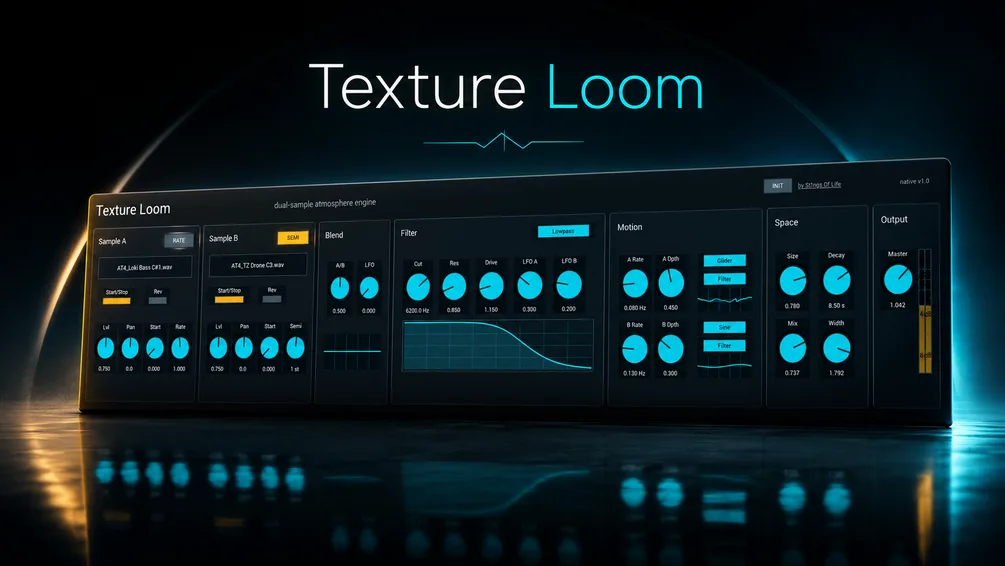
- Dual-sample playback engine for blending two user-loaded audio sources into one evolving instrument patch.
- Equal-power A/B blend control with a dedicated Blend LFO for slow, animated crossfades.
- Per-sample start, reverse, level, pan, and rate controls, including RATE / SEMI behavior for speed or semitone movement.
- Multimode filter with lowpass, highpass, bandpass, notch, peak, and allpass modes plus resonance, drive, and LFO depth.
- Two Motion LFOs with sine, triangle, ramp, random, drift, and glider shapes for routing movement to blend, filter, space, sample start, or sample speed.
- Built-in stereo space/reverb section with size, decay, mix, and width controls for turning dry material into wider atmospheres.
- Includes Max for Live plus native macOS AU, macOS VST3, and Windows VST3 instrument builds.
Description
Texture Loom is a dual-sample atmosphere instrument from S1gns Of L1fe for turning your own audio into pads, drones, cinematic beds, and slow-moving textural layers. It loads two samples, lets you blend between them, and then shapes the result with playback controls, filtering, motion LFOs, and a stereo space section.
The official Gumroad page frames it as an instrument rather than an audio effect, so a blank instance will not make sound until you load material into Sample A and Sample B. That workflow makes it more useful as a sound-design source than as a conventional preset synth, especially when feeding it field recordings, vocals, guitars, noise, or one-shot synth material.
Its strongest idea is motion without a complicated setup. The equal-power blend control, Blend LFO, multimode filter, and two Motion LFOs can push the two sources through drifting crossfades, start-position movement, speed changes, and reverb-size modulation.
The included Max for Live version targets Ableton Live 12 and Max 9, while the native builds cover macOS AU, macOS VST3, and Windows VST3 hosts. The product page lists version 1.0.1 at 4.41 MB and continues to describe the release as a free/name-your-price sound-design tool.
Video Preview

Frequently Asked Questions
Is Texture Loom an instrument or an audio effect?
Texture Loom is an instrument. The developer notes that it should be loaded on an instrument track or software instrument channel, and a blank instance will stay silent until samples are loaded.
Can Texture Loom use my own samples?
Yes. The core workflow is loading your own audio into Sample A and Sample B, then blending, filtering, and modulating those sources into a playable atmospheric layer.
Does the Ableton version require Max for Live?
Yes. The Max for Live build is listed for Ableton Live 12 and Max 9, while the native macOS and Windows plugin builds are separate options for non-Ableton hosts.
Why does a new instance make no sound?
The developer specifically notes that a blank instance makes no sound until samples are loaded. If you save a project with samples loaded, Texture Loom restores those sample paths when the project opens again.


