
RS Stereo Delay
Key Features
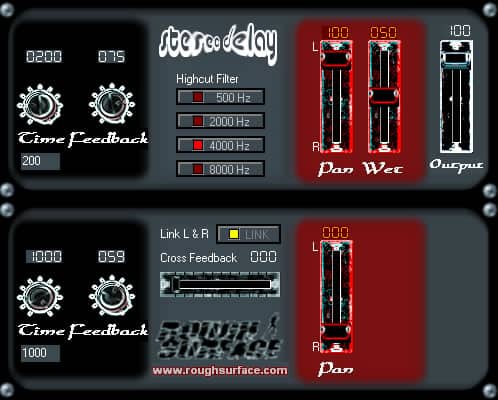
- Two independent delay sections that can run separately or in linked stereo mode.
- Delay time from 0 to 1000 milliseconds.
- Feedback and cross-feedback controls from 0 to 99 percent.
- Panorama controls for placing delayed signal in the stereo image.
- Wet/dry balance and output-level controls.
- High-cut section with four predefined frequencies.
- Link switch activates the second delay unit for stereo operation.
Description
RS Stereo Delay is a two-section delay effect from Rough Surface with independent left and right delay units. Delay time can be set from 0 to 1000 milliseconds, while feedback, pan, wet/dry balance, output level, high-cut filtering, and cross-feedback shape the repeat pattern and stereo image.
The Link switch activates the second delay unit for stereo operation; without it, the effect can work as a single mono section. Separate panorama controllers place the delayed signal, and cross-feedback routes delayed material between the two units for wider or more unstable repeats.
High feedback and cross-feedback values can create continuous loops, so use them carefully when setting up long repeats. The high-cut section offers four predefined frequencies, and the output fader cannot amplify beyond the input level.
Video Preview

Frequently Asked Questions
What is the delay-time range?
Rough Surface lists a delay-time range from 0 to 1000 milliseconds. The time can be entered with the controls or through the input field below them.
How does stereo linking work?
The Link switch activates the second delay unit and enables stereo operation. Without Link, the first delay section can be used as a mono setup.
Can feedback create runaway loops?
Yes. The developer warns that high feedback and cross-feedback values can create continuous loops. Keep both controls moderate when you need a controlled repeat tail.


