
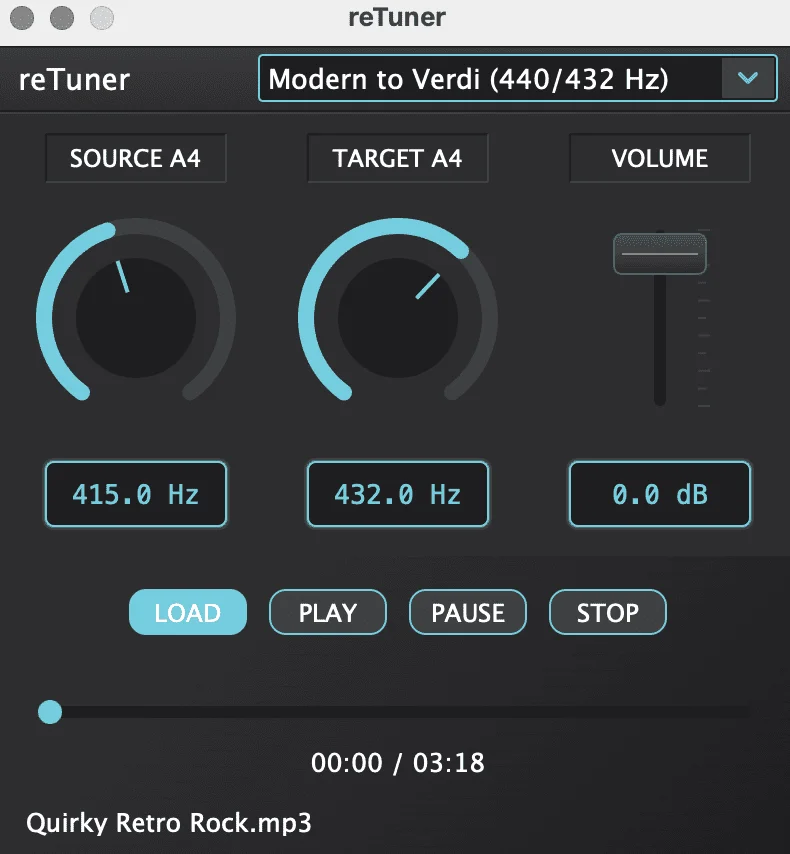
reTuner
Key Features
- Source and target A4 controls let you move complete tracks between alternate concert pitches without manually calculating cents or semitone offsets.
- Rubber Band Library processing keeps pitch changes cleaner and more natural than rough delay-based shifters, which matters when you are retuning full mixes or acoustic material.
- Ten factory presets plus 0.1 Hz tuning resolution make quick A440, A432, A430, A415, and A444 comparisons far faster than setting every conversion by hand.
- Formant-preserving processing and the built-in volume trim help you evaluate alternate tunings without turning the plugin into an obvious special-effect box.
- VST3, LV2, CLAP, AU, and standalone support make the same retuning workflow usable in mainstream DAWs, Linux-native production setups, or simple file-based audition sessions.
- Official Windows, macOS, and Linux builds plus GPL-3.0 source access make reTuner easy to deploy across mixed studio environments and transparent to inspect if you want to understand the processing path.
Description
reTuner is a cross-platform pitch shifting plugin from Kushview that focuses on retuning complete audio between reference standards like A440, A432, and Baroque-era pitches rather than acting like a vocal auto-tune insert. The official page and README frame it as a precision utility for full songs, instrumental stems, and standalone file playback, with source and target A4 controls that let you move between historical, wellness, or custom tuning targets without rebuilding the audio.
That narrow brief is what makes it useful. Kushview builds reTuner around the Rubber Band Library, and the current release couples formant-preserving processing with 0.1 Hz tuning control, a ±3 semitone working range, 10 built-in presets, and a volume trim so you can audition alternate tunings quickly instead of doing rough cents math by hand.
The plugin also ships in VST3, LV2, CLAP, AU, and standalone form. That combination gives it broader real-world coverage than many niche tuning tools, especially now that the current build set spans Windows, macOS, and Linux.
Editorial coverage and Kushview's own launch notes point to the same sweet spot: reTuner is less about synthetic harmonizer tricks and more about transparent retuning jobs where you want to compare 440 Hz against 432 Hz, match recordings cut at different concert pitches, or prep meditation, restoration, and period-accurate material with minimal setup. Version 1.1.0 adds more presets and brings official Linux support, which makes the utility more practical across mixed studio environments.
As checked on April 26, 2026, the official Kushview product page still lists reTuner at $0.00, the shop still routes users to the public GitHub release builds, and the latest 1.1.0 installers for Windows, macOS, and Linux remain directly downloadable with no checkout, signup, trial, or expiry language. That reads as a durable free release rather than a temporary giveaway.
Frequently Asked Questions
Can reTuner retune full songs or is it only for vocals?
It is designed for complete audio material, not just monophonic vocal lines. Kushview describes it as a tuning-conversion tool for music between reference standards, and the README plus standalone app support make it clear that full songs, stems, and other rendered audio are part of the intended workflow.
How much tuning range does reTuner cover?
The official product page lists source and target A4 controls from 380 Hz to 460 Hz, and Kushview describes the working range as roughly plus or minus three semitones. The launch article also notes 0.1 Hz adjustment precision, which is useful when you want something more exact than a fixed preset.
Does reTuner work outside a DAW?
Yes. Kushview ships a standalone application alongside the plugin formats, and both the product page and README mention audio file playback, which makes it useful when you just want to audition or convert files without building a DAW session first.
Is Linux support part of the current public release?
Yes. Kushview's January 4, 2026 release post for version 1.1.0 says Linux is now officially supported, and the latest public GitHub release includes a Linux package alongside the Windows and macOS installers.
Is reTuner still permanently free right now?
As checked on April 26, 2026, the official Kushview product page still shows reTuner at $0.00, the Kushview shop still links to the public GitHub releases, and the live pages do not show trial, countdown, or limited-time giveaway language. That supports treating it as an ongoing free release.


