
Preamble
Key Features
- Neural model captures the input stage of a bucket-brigade delay pedal without its delay effect.
- Input level controls the amount of preamp saturation and compression.
- Auto Gain compensates for level changes as input drive increases.
- Lo Cut and Hi Cut shape the wet signal while leaving the dry signal full range.
- Mix control blends processed and dry paths for parallel distortion.
- Interactive spectrum analyser displays both paths and adjusts the filter band.
- Optional 2x or 4x oversampling reduces aliasing on heavily driven bright sounds.
Description
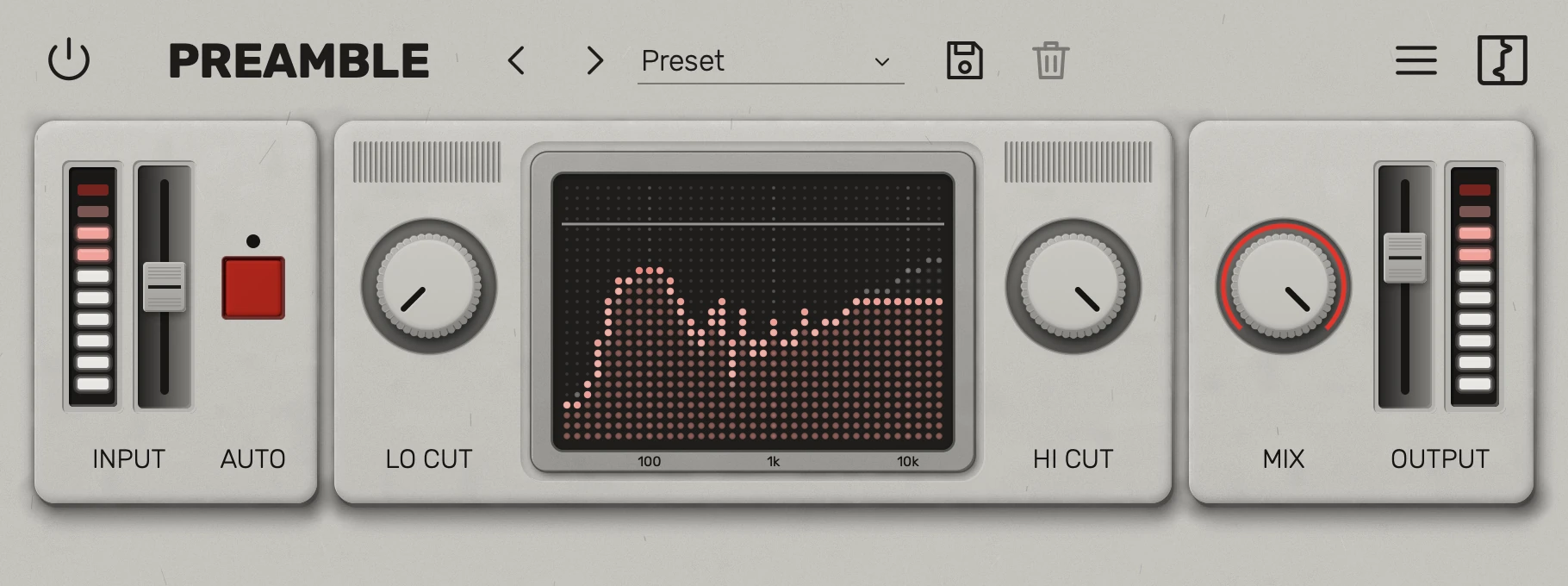
Preamble is a preamp distortion plugin from Reasonable Audio that models the input stage of a bucket-brigade delay pedal. It provides the pedal's coloration without the delay, making it useful before an amp simulation or as a character effect on other sources.
The Input control drives the modeled circuit into saturation and compression, from a softer rounding of the signal to a sharper, buzzing sound. Auto Gain compensates as you increase the input, helping you compare tonal changes at a more consistent level.
Lo Cut and Hi Cut shape only the processed signal after the preamp, while Mix blends that signal with the unfiltered dry input. A spectrum display shows both paths and lets you adjust the filter band by dragging, giving you a way to focus the distorted layer on a particular range.
Try it on a guitar DI before an amp, or add character to bass, drums and synths. Optional 2x and 4x oversampling helps reduce aliasing when bright signals are driven hard, and factory and user presets offer starting points for different settings.
Preamble supports desktop plugin formats on macOS, Windows and Linux; the developer lists an iOS version as coming soon. Downloading and activating it requires a free Reasonable Audio account.
Video Preview

Frequently Asked Questions
Does Preamble include a delay effect?
No. It models the preamp input stage of a bucket-brigade delay pedal; the delay itself is not included.
How do the filters interact with the dry signal?
Lo Cut and Hi Cut follow the preamp on the wet path. The dry path remains unfiltered, so you can blend it back with the Mix control.
How do I activate Preamble?
Create a free Reasonable Audio account and use it to obtain and activate the plugin. The developer’s product page provides the sign-up and sign-in actions.
What does Auto Gain do?
It compensates for the increase in level as Input pushes the preamp harder. This makes it easier to compare the change in character without a large volume jump.


