Meter Core

Key Features
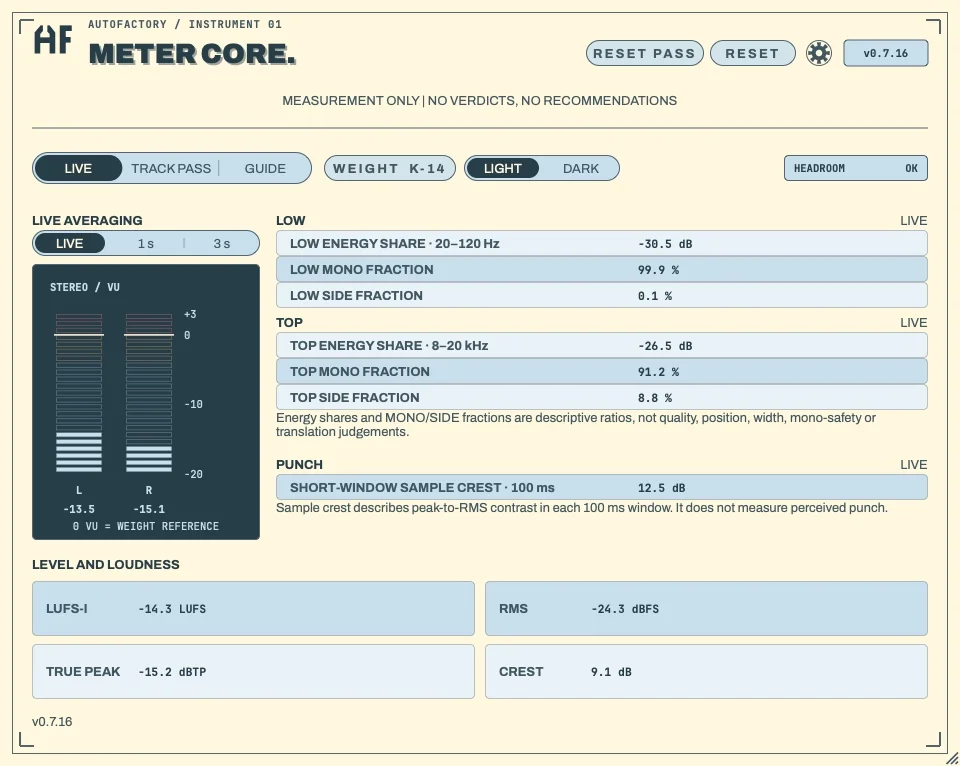
- Shows integrated LUFS, estimated true peak, RMS, crest, stereo VU and a separate HEADROOM warning.
- Measures LOW energy share at 20–120 Hz and TOP energy share at 8–20 kHz, with mono and side fractions in each band.
- Reports PUNCH as short-window sample crest over 100 ms, with its measurement limits explained.
- Offers LIVE, 1 s and 3 s averaging for the Live tab’s LOW, TOP and PUNCH displays.
- Captures separate Track Pass measurements and stores your own passes in A/B slots for side-by-side comparison.
- Explains readings through the Guide and a light/dark Pastel interface, while leaving interpretation and mix decisions to you.
Description
Meter Core is a free metering plugin from AutoFactory Audio for macOS and Windows that explains signal measurements in plain language. Version 0.7.16 shows low- and high-frequency energy, mono and side fractions, short-window crest, and loudness while leaving mix decisions to the producer.
The level section brings together integrated loudness (LUFS-I), estimated true peak, RMS, crest and stereo VU meters. A separate HEADROOM display flags clipping, while the accompanying help explains what each reading represents rather than prescribing how the mix should sound.
LOW covers 20–120 Hz and TOP covers 8–20 kHz, with energy-share readings and the MONO and SIDE fractions inside each band. PUNCH reports sample peak-to-RMS contrast over a 100 ms window, which is a signal measurement rather than a measure of perceived punch.
The Live tab offers LIVE, 1 s and 3 s averaging, while Track Pass captures measurements for a complete playback separately from the live meter. A/B slots store your own captured passes for side-by-side viewing, and resetting a pass does not clear the live readings.
The light and dark Pastel interface uses larger text, and the built-in Guide links the readings to the developer's published measurement definitions. Meter Core is available as AU and VST3 on macOS and 64-bit VST3 on Windows, with direct free downloads and an optional email-link form that is not required to get the plugin.
Video Preview

Frequently Asked Questions
What do the LOW and TOP panels show?
LOW measures energy in the 20–120 Hz band and TOP measures 8–20 kHz. Each panel also shows the mono and side fractions within that band. These ratios describe the signal rather than judging stereo width or whether a mix will work on another playback system.
What does the PUNCH reading measure?
It is short-window sample crest: the sample peak-to-RMS contrast in a 100 ms window. The developer explicitly distinguishes this from perceived punch. The separate CREST level reading and Track Pass crest summaries use a different, older peak-minus-RMS measurement.
How does Track Pass work in the current version?
Track Pass captures a playback’s measurements separately from the live view. It provides measurement summaries and A/B slots for comparing your own captured passes. Resetting the pass leaves the live readings intact, and the A/B slots do not analyse an imported reference file.
Which platforms are supported, and is signup required?
Version 0.7.16 is available for macOS as AU and VST3 and for 64-bit Windows as VST3. The official page provides direct free downloads. Its email-link and update form is optional.