Hardwave Analyser
Key Features
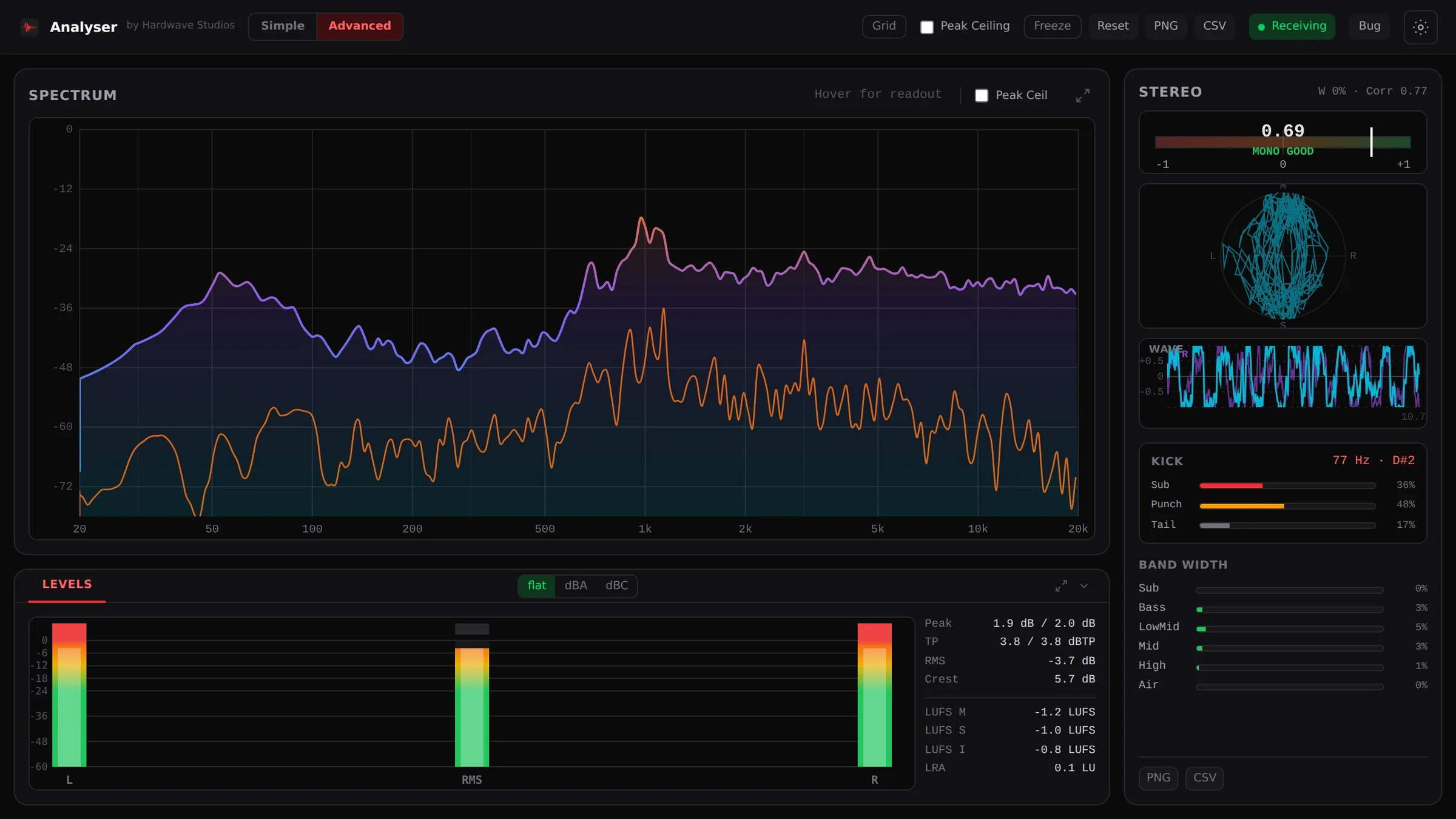
- Spectrum from 20 Hz to 20 kHz shows the mix and side signal together for frequency-balance checks.
- Adjustable tilt from -9 to +9 dB per octave, plus A and C weighting, adapts the display to the material.
- Phase correlation and a goniometer help inspect stereo information and mono compatibility.
- Width readings for Sub, Bass, Low mid, Mid, High and Air show how the stereo field varies by band.
- Peak, four-times-oversampled true peak, RMS, crest factor and LUFS metering share one window.
- Simple and Advanced modes offer a reduced display or the full readout inside the plug-in window.
- Hardwave Suite installs and updates the free, account-based plug-in on Windows, macOS and Linux.
Description
Hardwave Analyser is a spectrum-analysis and metering plug-in for checking frequency balance, stereo information and levels inside a DAW. It is aimed at loud, dense harder-styles mixes, with views that help producers inspect kick and bass balance before changing EQ or stereo processing.
The spectrum covers 20 Hz to 20 kHz and shows the mix alongside its side signal. Tilt adjusts from -9 to +9 dB per octave with A and C weighting, while phase correlation, a goniometer and width readings for Sub, Bass, Low mid, Mid, High and Air help check the stereo field.
Level tools include peak, four-times-oversampled true peak, RMS, crest factor and LUFS. Advanced mode exposes the full readout, while Simple mode keeps the spectrum and main meters visible for quicker checks during writing.
Version 1.0.33 is the stable release and reduces work on the DAW's audio thread. On Hardwave's test machine, the developer reports that this cost fell from 12–30% of one CPU core to about 0.5%; these are developer measurements, not an independent benchmark or a guarantee for every system.
The plug-in is available as VST3 and CLAP for Windows, macOS and Linux, with FL Studio, Ableton Live, Bitwig and Reaper among the developer's tested hosts. It is free with a Hardwave account, and Hardwave Suite handles installation and updates.
Frequently Asked Questions
What does Hardwave Analyser measure?
Hardwave Analyser combines a spectrum and side-signal display with phase correlation, a goniometer and per-band stereo width. Its level section includes peak, four-times-oversampled true peak, RMS, crest factor and LUFS.
Why is it aimed at kick and bass work?
The spectrum and per-band width readings help inspect the low end and the relationship between kick and bass. Correlation and stereo views provide additional information when checking mono compatibility.
Which plug-in formats and platforms are supported?
The current release supports VST3 and CLAP on Windows, macOS and Linux. Hardwave lists FL Studio, Ableton Live, Bitwig and Reaper among its tested DAWs.
Do I need a Hardwave account to install Analyser?
Yes. Analyser is free with a Hardwave account, with no payment card required. Install Hardwave Suite and sign in so it can install the plug-in and keep it up to date.
What changed in version 1.0.33?
The stable release reduces work on the DAW audio thread. Hardwave reports a reduction from 12–30% of a CPU core to about 0.5% on its test machine, so actual performance depends on the system and project. The developer also lists 1.0.34-rc1 separately as a beta.