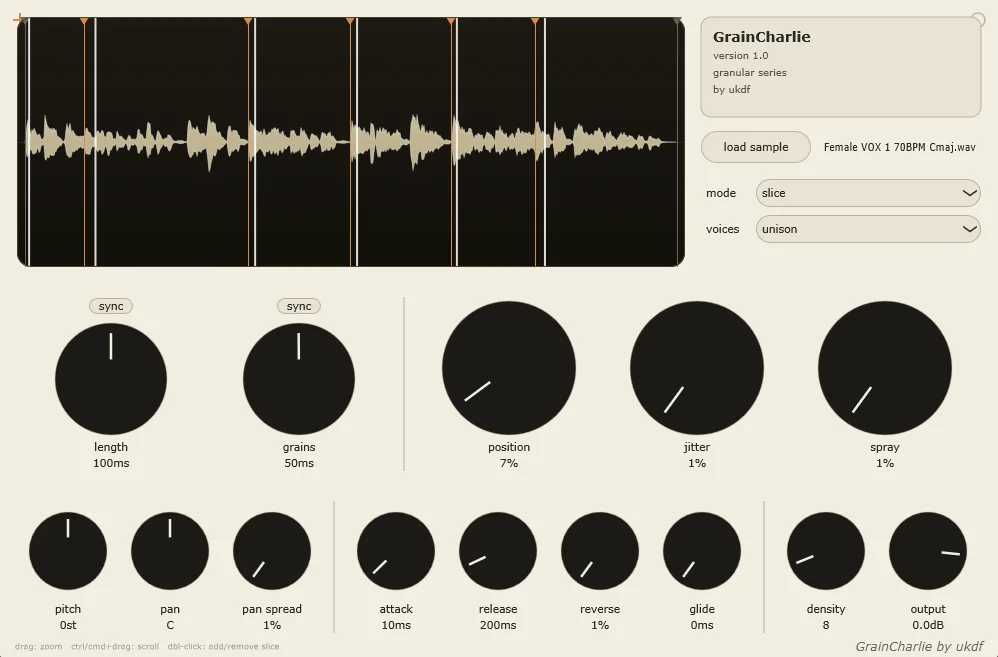
GrainCharlie
Key Features
- Loads your own source audio and turns it into a MIDI-playable granular instrument rather than locking you into a fixed sample library.
- Offers Melody, Slice, and Slice Melody workflows for conventional granular playback, sampler-like triggering, or pitched slices with granular control.
- Tempo-syncable grain Length and Grains controls help lock particle duration and density to the project rhythm.
- Combines Position, Spray, and Jitter to move the grain source point from controlled repetition to more unpredictable motion.
- Adds stereo and timbral movement with pitch, Pan Spread, Density, and random Reverse playback controls.
- Includes Unison with Glide plus an eight-note Polyphonic mode for layered leads, pads, and playable sample textures.
- Uses Attack and Release controls to shape sharp sliced hits or slower, sustained granular layers.
Description
GrainCharlie is a sample-based granular synthesizer built to make short recordings playable without burying the user in a complex workflow. Load a sample, choose Melody, Slice, or Slice Melody, and it turns that source into pitched grains, individually triggered slices, or a hybrid of both for quick melodic fragments and textured sound design.
The Slice Melody mode is the standout: it keeps the sliced character of a recording while tracking the MIDI notes you play. That makes it a practical way to turn vocals, field recordings, percussion, or found sounds into playable hooks that retain some granular unpredictability.
Grain controls how many particles are generated and Length sets their duration, with tempo sync available for both. Position, Spray, and Jitter shape where grains begin and how far they wander, while Density, reverse probability, pitch, pan, and Pan Spread supply the movement needed for airy pads, glitchy rhythms, and unstable stereo detail.
For a more conventional performance setup, Unison layers voices and adds Glide, while Polyphonic mode allows up to eight simultaneous notes. Attack and Release provide a simple envelope stage, so the instrument can move from short stabs to slower, softer layers without relying on an external sampler.
GrainCharlie deliberately favors a focused control set over a multi-engine design. It is a strong starting point for producers who want to explore granular sound design with their own audio, then develop results further with DAW effects and automation.
Frequently Asked Questions
What is the difference between Melody, Slice, and Slice Melody?
Melody is the conventional granular mode, where the sample is broken into grains and their pitch follows the MIDI notes you play. Slice lets you trigger separate sample sections, while Slice Melody combines sliced playback with MIDI pitch tracking so one recording can become a melodic instrument.
Can GrainCharlie make sustained pads as well as chopped sounds?
Yes. Longer grain settings, slower envelope values, Density, and Pan Spread can turn a source recording into a broad, moving layer. Slice and short grain settings are better suited to rhythmic cuts and more percussive material.
How much polyphony does GrainCharlie have?
Its Polyphonic mode supports up to eight simultaneous notes. The separate Unison mode layers multiple voices and provides Glide for smoother note transitions.
Which plugin format does GrainCharlie use?
GrainCharlie is supplied as VST3 only. The official Gumroad page offers a Windows installer and a manual-install VST3 package for macOS and Windows.