
GDelay
Key Features
- Digital delay line provides echo times up to two seconds for short slapback, rhythmic repeats, and longer ambient trails.
- Feedback control returns delayed audio to the delay line, from restrained repeats to deliberately chaotic wash effects.
- Separate Dry and Effect level controls make it usable as either a conventional insert or a fully wet send effect.
- Four-knob interface keeps delay time and repeat balance immediately accessible without deeper menus.
- User-editable parameter readouts let you set exact values rather than relying only on knob position.
- Official GVST distribution is available for VST workflows on Windows, macOS, and Linux.
Description
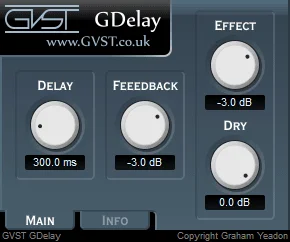
GDelay is a compact digital delay effect from GVST that creates echoes up to two seconds long. Its four controls cover delay time, feedback, dry level, and effected-signal level, keeping the workflow focused on setting a repeat and balancing it against the original sound.
The layout works as either an insert effect or a send. On a send, GVST recommends turning the dry level down and keeping the effected signal at full level, while the separate controls make it straightforward to use GDelay directly on a track when a parallel bus is unnecessary.
Feedback is the creative control: modest settings make conventional repeats, while high settings can build into unstable washes. That makes the plugin a practical choice for short vocal or guitar echoes as well as more exaggerated transition and ambient effects.
GDelay deliberately stays away from sync menus, modulation sections, and multi-tap programming. It is best treated as a simple, manual-time delay for producers who want to hear the feedback path clearly and make quick repeat-level decisions without a larger delay processor.
Frequently Asked Questions
Can GDelay be used on a send bus?
Yes. GVST states that GDelay can work as a send or insert effect. For send use, its manual recommends setting Dry to -Inf and Effect to 0 dB so the bus returns only the processed signal.
What does the Feedback control do in GDelay?
Feedback sets how much delayed signal is fed back into the delay line. Lower settings create a smaller number of repeats, while high values can build into the chaotic wash effects GVST describes.
Does GDelay offer tempo sync?
The current official GDelay page and manual describe a manual delay-time control and do not list host-tempo sync. Set the delay length by ear or calculate the required milliseconds from the project tempo.


