
Key Features
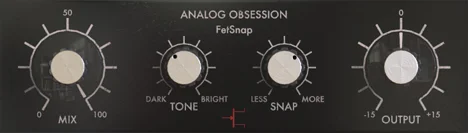
- Enhance attacks and shorten release with the Snap control
- Shape the signal before saturation with Tone
- Blend processed and original audio with Mix
- Adjust the final level after the wet and dry blend
- Enable oversampling from the Analog Obsession label
- Resize the interface and bypass processing from the plugin window
Description
FetSnap is a transient enhancer from Analog Obsession that adds attack and FET-inspired color to audio. Its compact controls make it a useful choice for bringing drums and other percussive sounds forward in a mix.
The Snap control increases the prominence of the attack while shortening the signal's release. Rather than offering separate attack and release controls, it puts the main transient adjustment on one knob.
Tone shapes the signal before the drive stage, influencing the frequencies that feed the saturation. Try it on a drum loop or a picked instrument when you want to change the emphasis as well as the punch.
Mix blends the processed sound with the original, allowing a more restrained result without setting up a separate parallel channel. An output control adjusts the level after the blend, and the plugin label acts as a bypass switch.
Clicking the Analog Obsession label engages oversampling, and the corner handle resizes the interface from 50% to 200%. The developer recommends saving a default preset in your DAW if you want new instances to open at your preferred size.
FetSnap is available alongside FETish and FetDrive on the developer's FET Bundle page. The focused design suits producers who want quick transient emphasis and coloration without a large set of timing controls.
Frequently Asked Questions
What does the Snap control do?
Snap enhances the attack and reduces the release of the signal. It combines the main transient adjustment into one control.
Can I blend FetSnap with the unprocessed signal?
Yes. The Mix control blends the processed and dry signals, and Output sets the level after the blend.
How do I enable oversampling?
Click the Analog Obsession label to engage oversampling; the label turns red. Click the plugin label to bypass the effect.
Can I keep the interface at my preferred size?
Drag the bottom-right corner handle to resize it. The developer suggests saving the resized state as your DAW’s default preset for new instances.


