
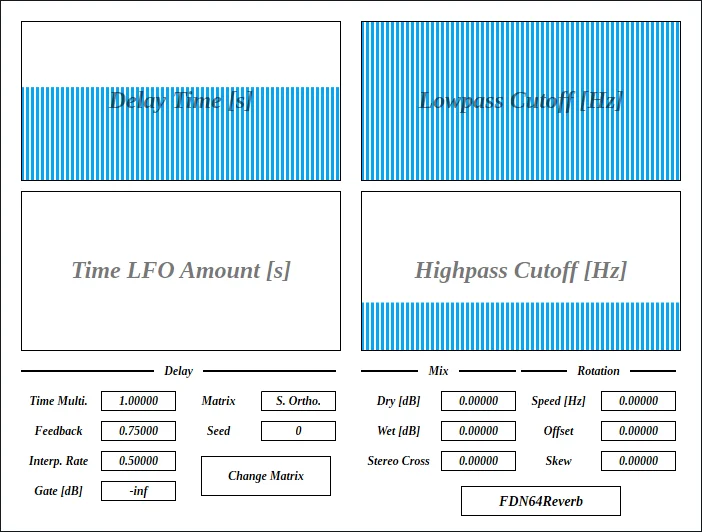
FDN64Reverb
Key Features
- 64-delay feedback delay network for dense synthetic reverb tails
- Multiple feedback matrix modes including orthogonal, circulant, Schroeder, Hadamard, and conference options
- Independent parameter control for deep shaping of delay, feedback, mix, gate, and rotation behavior
- Rotation controls for moving the input gain pattern through the feedback network
- Gate control for quickly stopping long or unstable reverb tails
- Customizable GUI style settings with scale, font, foreground, background, border, and highlight options
- Open-source GPLv3 release with current official builds maintained through the developer's GitHub workflow
Description
FDN64Reverb is an experimental algorithmic reverb built around a 64-delay feedback delay network. Instead of presenting a simple room or plate model, it exposes deep matrix, delay, feedback, mix, gate, and rotation controls for designing dense synthetic spaces.
The plugin is best treated as a sound-design reverb rather than a quick mix sweetener. Its large feedback matrix can create wide, evolving tails, strange metallic colors, and abrupt gated stops, but the developer also warns that the design is heavy on CPU and may be better used with DAW freeze or bounce workflows.
Current official builds are distributed as VST3 packages for Windows, Linux, and macOS, with the macOS build requiring extra Gatekeeper steps because it is ad-hoc signed. The official page also includes preset installation notes, Linux package guidance, GUI style configuration, and a GPLv3 license link, making it a transparent choice for producers who want a tweakable open-source reverb with unusual internal structure.
Video Preview

Frequently Asked Questions
Why is FDN64Reverb more CPU-heavy than a simple reverb?
The developer notes that the plugin uses a 64 by 64 feedback matrix, which makes the internal network much larger than many basic reverb designs. For heavy sessions, the official guidance is to use your DAW's freeze or bounce function when needed.
What makes the matrix options useful?
The different matrix modes change how energy circulates through the delay network. Cleaner options can produce smoother tails, while rougher or stranger modes can push the plugin toward metallic, special-effect, or intentionally unstable textures.
Does FDN64Reverb include presets?
Yes. The official manual links a preset download and explains where to place the Uhhyou preset folder on Windows, Linux, and macOS.
Is the macOS version notarized?
No. The developer says the macOS package is ad-hoc signed and includes manual Gatekeeper workaround instructions on the product page.


