
Key Features
- Play recordings from 59 original Emulator I disks, including a drum set
- Use manually edited and looped sounds recorded from a real Emulator I
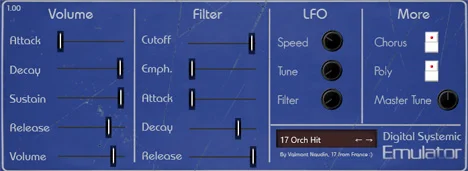
- Shape volume over time with an ADSR envelope
- Adjust cutoff and emphasis with a separate ADR filter envelope
- Modulate tuning and filter with a sine LFO
- Add chorus, switch mono or poly playback, and adjust master tuning
Description
Emulator I is a sample-based instrument by Digital Systemic Emulations built around recordings of the original E-mu Emulator I. It puts a collection of early digital sampler sounds, including drums, into a plugin with familiar envelope and filter controls.
The developer lists 59 original disks in the version 1.05 collection and says the recordings were manually cut and looped. The selection offers a way to add the grainy character of an early sampler to keyboard parts and productions without operating the original hardware.
An amplitude ADSR shapes the attack and release of each sound, while a separate filter section adds cutoff, emphasis and an ADR envelope. A sine LFO can modulate tuning and filter, and chorus, mono or poly operation and master tuning provide additional ways to shape a patch.
The instrument is a rompler centered on its included recordings, rather than a general-purpose sample editor. Its restrained controls make it suited to quickly choosing a sound and adjusting its contour for retro arrangements, while its older design calls for checking compatibility in your own host.
The developer offers 64-bit Windows VST2 and VST3 builds and a Mac AU build, with installation instructions on the site. Windows users may need the Visual C++ 2015 runtime, and the developer lists macOS 10.7 as the minimum Mac version.
Video Preview

Frequently Asked Questions
Can Emulator I load my own samples?
The developer describes a fixed collection of recordings from Emulator I disks and does not list sample import. Treat it as a rompler for the included sounds.
Why might the Windows plugin fail to load?
The developer says the Visual C++ 2015 runtimes are needed on Windows and links to Microsoft’s installer. Check that dependency and your host’s plugin format and bitness if the instrument does not appear.
Are patches saved reliably in a project?
The KVR listing warns that presets are not saved. Test recall in your own host and consider rendering important parts to audio before relying on a session.
Why do some listings say 58 disks instead of 59?
The older Plugins4Free listing describes 58 disks. The developer lists 59 and says version 1.05 added a previously omitted sound.


