


Key Features
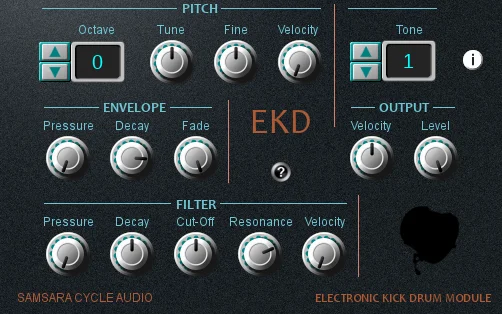
- Create electronic kick drum sounds in a dedicated instrument
- Explore 128 included tones
- Start from a selection of 128 patches
- Adjust kick tuning with the pitch section
- Shape the sound using the envelope section
- Change tonal balance with the filter section
- Assign controls using MIDI Learn
Description
EKD is an electronic kick drum instrument from Samsara Cycle Audio for creating bass drum sounds in a VST host. It brings kick selection and shaping controls together in a focused instrument for electronic beat making.
The instrument provides 128 tones and 128 patches, giving you starting points to explore before changing the sound. Its pitch, envelope and filter sections let you work on different aspects of a kick, from its tuning to its shape and tonal balance.
MIDI Learn adds a way to assign controls for hands-on work while developing a beat. The dedicated kick-drum focus makes EKD useful when you want to work on the foundation of a rhythm without opening a full drum machine.
The original release is a 32-bit Windows VST, so check whether your host can run that format before relying on it in a project. The developer's product page includes installation instructions and a download link, along with an optional donation request.
EKD is a compact choice for producers who enjoy adjusting electronic drums themselves. Its narrower scope is worth keeping in mind if your workflow calls for a complete multi-piece drum instrument or newer native plugin formats.
Frequently Asked Questions
What kind of instrument is EKD?
EKD is an electronic kick drum instrument. It concentrates on bass drum sounds rather than providing a complete drum kit.
Can I shape the kick sounds?
Yes. EKD includes pitch, envelope and filter sections for adjusting its sounds.
Does EKD support MIDI control?
The developer lists MIDI Learn among its features. This can be used to assign controls for a hands-on workflow.
How is EKD installed?
The developer instructs users to unzip the download and place the DLL in the folder scanned by their VST host. Check your host’s plugin folder settings if it does not appear.


