
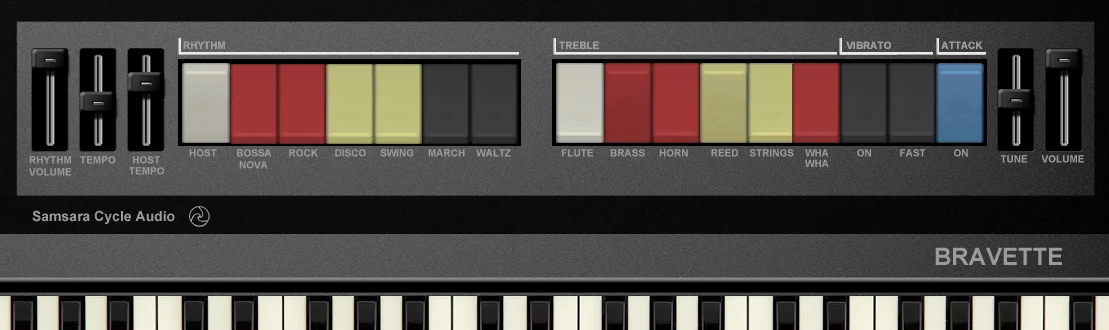
Bravette

Key Features
- Play vintage home-organ sounds from a VST host
- Choose from selectable organ voices
- Select an old-school rhythm accompaniment
- Adjust the rhythm tempo
- Tune the instrument to fit a session
Description
Bravette is a home organ instrument by Samsara Cycle Audio, with selectable voices and an old-school rhythm section. Its compact set of controls is aimed at recreating the playful character of a vintage home keyboard in a VST host.
Choose a voice for the keyboard part, then select a rhythm to accompany it. Separate tempo and tuning controls give you basic ways to adjust the performance to the music around it.
The developer suggests the instrument for adding a home-organ feel to reggae and ska, though its deliberately nostalgic character can also suit playful retro arrangements. One listener described it as a convincingly cheesy home organ, while another reported difficulty getting the rhythms to follow host tempo.
Bravette is listed as a 32-bit Windows VST, so check that your host can load that format before planning a session around it. The developer's installation instructions place the extracted DLL in the folder scanned by your VST host.
This is a focused instrument rather than a broad organ workstation: its published feature list centers on voice and rhythm selection, tempo, and tuning. Try it when those straightforward controls and a home-keyboard sound fit the part you want to make.
Frequently Asked Questions
What kind of sound is Bravette designed to make?
Bravette aims for the character of a vintage home organ and includes selectable voices. The developer suggests it for music including reggae and ska.
Does Bravette include rhythms?
Yes. It offers selectable rhythms and a tempo control alongside the organ voices.
Will its rhythms follow my DAW tempo?
The developer lists a tempo control but does not document host synchronization. One user reported a problem with host tempo sync, so test the rhythm section in your setup.
How is Bravette installed?
The developer instructs users to unzip the download and place Samsara_Bravette.dll in the folder scanned by their VST host. The listing identifies it as a 32-bit Windows VST.


