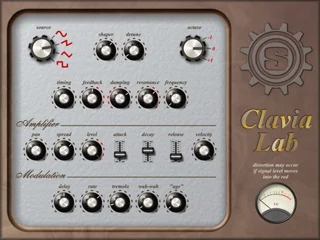
Clavia Lab

Key Features
- Hybrid analogue and physical modelling for electric piano tones
- Source tone and resonance controls for shaping the sound
- Comb-filter-style delay model adds resonant character
- Separate amplifier controls for adjusting the output
- Modulation section for adding movement to patches
- Eight factory presets and space for eight additional sounds
- VU meter for monitoring signal level and potential distortion
Description
Clavia Lab is a hybrid analogue and physical modelling instrument from Simple Media that creates electric piano sounds. Its sound engine combines a source section with a resonant model, giving players room to shape a keyboard tone beyond a straightforward vintage piano imitation.
The source and resonance controls feed a comb-filter-style delay model, while a separate amplifier section adjusts the output character. Modulation controls add further movement, making the instrument useful for exploring more synthetic keyboard colours as well as familiar electric piano territory.
Eight factory presets offer starting points, with space for eight more sounds. A VU meter helps show when the signal is approaching distortion, so you can watch the level as you experiment with the controls.
Clavia Lab supports eight-note polyphony, which suits chord parts and melodic playing while placing a clear limit on sustained passages. Its detailed controls invite adjustment of the source, amplifier and modulation rather than relying only on preset selection.
The plugin is a 32-bit Windows VST instrument, so check whether your host can load that format before using it in a current project. Some users appreciate its unusual character, while others report that managing distortion and the circular knob movement takes practice.
Frequently Asked Questions
How many notes can Clavia Lab play at once?
The instrument has eight-note polyphony. Sustained chords and overlapping notes share those eight voices.
Can I save my own sounds?
The plugin includes eight presets and room for eight more. You can use the additional slots for your own settings.
What does the VU meter show?
The meter indicates when the tone is likely to distort. Use it alongside your ears when adjusting the sound and level.