
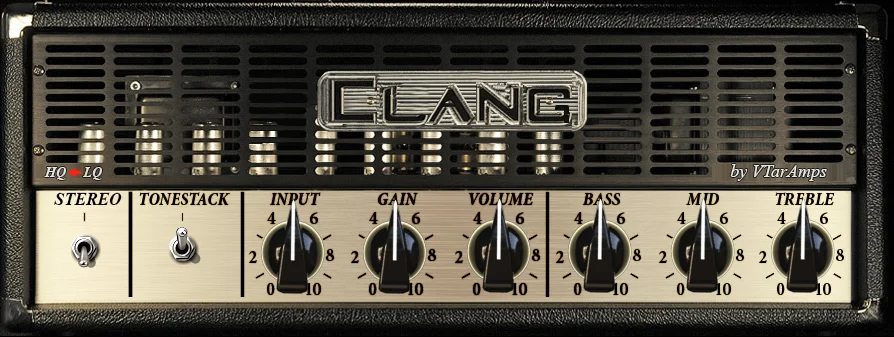
Clang

Key Features
- High-gain amp simulation aimed at metal guitar tones
- Input, gain and volume controls for setting the drive and output
- Bass, mid and treble controls for shaping the amp tone
- Tone stack switch adds another tonal option
- Stereo mode processes left and right inputs together
- HQ and LQ settings trade oversampling against CPU use in stereo mode
Description
Clang is a high-gain guitar amp simulator by Vadim Taranov, designed for metal tones. It revisits the developer's Fourteen-MH2 reissue with a straightforward amp-style interface for shaping a distorted guitar signal.
The front panel puts input, gain and volume controls alongside bass, mid and treble knobs. These controls let you adjust the drive and tonal balance in a familiar amp workflow, while the tone stack switch offers another way to shape the response.
Stereo mode processes both input channels, making it useful when the source is already stereo. The developer notes that stereo processing increases CPU use, and that the LQ setting disables built-in oversampling to reduce the load when working in stereo.
For a complete guitar sound, follow the amp with a cabinet impulse response in a separate IR loader. VTarAmps recommends several third-party cabinet responses, so you can experiment with different speakers after setting the amp controls.
Clang is available as a Windows VST in 32-bit and 64-bit versions. Its focused amp design suits players who want to build a metal guitar chain around their own cabinet choices; check that your DAW supports the older VST format before installing.
Frequently Asked Questions
Does Clang include a cabinet impulse response loader?
The developer recommends separate cabinet impulse responses and does not document an included IR loader. Place an IR loader after Clang to audition cabinet sounds.
What does stereo mode do?
Stereo mode processes both left and right input channels. The developer says this increases CPU use compared with processing one channel.
What is the difference between HQ and LQ?
According to the developer’s description, LQ disables the built-in oversampling to reduce CPU use. The HQ/LQ choice is relevant in stereo mode.
Which systems and plugin formats are supported?
Plugins4Free lists Windows 32-bit and 64-bit VST versions. Mac, Linux and VST3 versions are not listed, so check your host’s support for VST before installing.


