
Key Features
- Continuously adjustable waveshaping from soft saturation to hard clipping
- Separate positive and negative curve and linear-region controls
- Linkable curve controls for symmetrical shaping
- Transfer-curve scope with positive and negative peak indicators
- Selectable oversampling up to 16x to reduce aliasing
- Switchable DC blocking and input/output gain controls
- Built-in presets for starting points
Description
Drive by Audec is a waveshaping distortion plugin for shaping audio from subtle saturation to hard clipping. Its adjustable transfer curve lets producers build both symmetrical and asymmetric distortion instead of choosing a fixed preset alone.
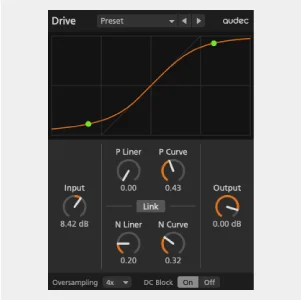
A central scope displays the relationship between input and output, with peak indicators showing where the signal reaches the curve. Separate positive and negative curve controls let you change the linear region and the nonlinear shape on each side, while a link button keeps the sides together when desired.
The input control pushes the signal into the waveshaper, and the output control adjusts the resulting level. This makes Drive useful for exploring how a synth, drum, bass, or other source changes as the curve and input gain interact.
Oversampling can be switched off or set from 2x to 16x to reduce aliasing; higher settings also increase processing load and latency. A DC block switch removes the direct-current component before output, and presets provide starting points for experiments.
The control labels take some learning, but the visual curve makes their effect easier to follow. Audec lists VST3 for Windows and VST3/AU for macOS; its stated operating system requirements are from the original release era, so check compatibility with newer systems before relying on it.
Frequently Asked Questions
How does Drive create asymmetric distortion?
Its positive and negative sides have separate linear-region and curve controls. Unlink them to adjust the two sides independently.
What does the oversampling control do?
It reduces aliasing caused by nonlinear processing. Higher settings require more CPU and add latency.
What is the DC Block switch for?
It enables a high-pass filter that removes the direct-current component before output. Audec recommends leaving it on normally.


