
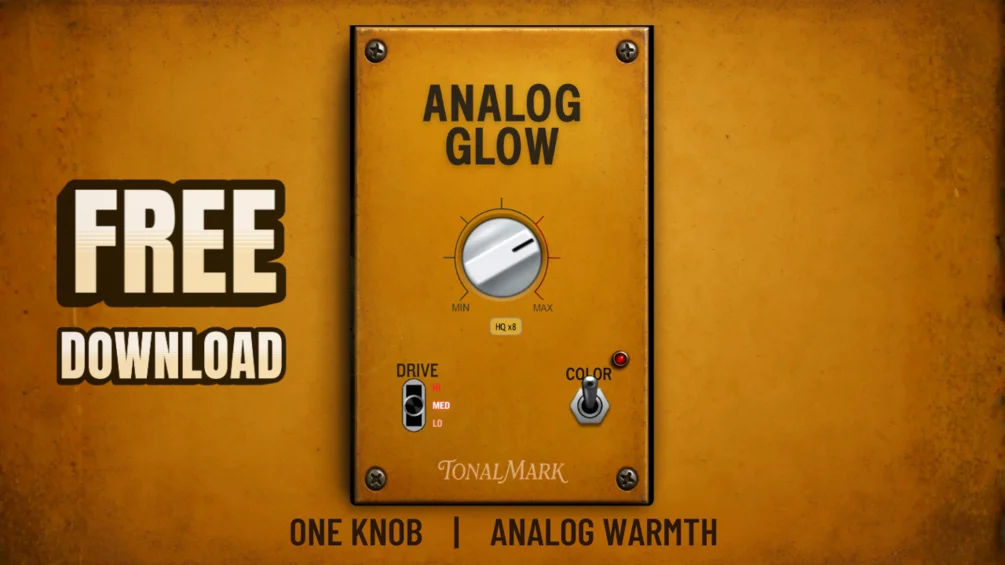
Analog Glow
Key Features
- The main Glow control is designed as a musical macro, so you can move from light thickening to more obvious saturation without building a full multi-stage channel strip around it.
- A custom saturation curve blends low-mid bloom, harmonic lift, and tape-style high-frequency softening, which gives the plugin more character than a generic drive knob.
- Three drive modes let the same interface cover subtle mix-bus sheen, thicker drums and guitars, or dirtier vintage-style breakup depending on how hard you want to lean into the effect.
- Color mode pushes the voicing darker and heavier, adding extra harmonic weight when the default tone feels too polite or modern for the source.
- HQ oversampling runs at 4x by default with an 8x option, helping the top end stay smoother when you push the saturation harder on bright material.
- The signed and notarized macOS installer keeps the workflow simple by dropping both AU and VST3 versions into place without extra format-by-format setup.
Description
Analog Glow is a macOS saturation plugin from TonalMark built around a one-knob warmth workflow instead of a full console-style channel strip. The official page positions it as a fast way to add analog character, tape-style high-frequency softening, and low-mid weight to vocals, drums, guitars, keys, bass, and mix-bus material.
That simplicity is real, but it is not as limited as the single main control suggests. Under the hood, Analog Glow combines a custom saturation curve, dynamic high-frequency softening, dual-stage harmonic shaping, three drive modes, and a Color mode that leans darker and more vintage when you want more density than polite sweetening.
Editorial coverage points to the same strength: it is easiest to like on broad tone-shaping jobs where you want a track to feel warmer, smoother, or more lived-in without stopping to fine-tune lots of parameters. Lower settings look especially useful for vocals, drum buses, guitars, basses, and synth parts that need sheen and glue, while the higher drive ranges can push farther into gritty breakup and lo-fi color.
As checked on April 26, 2026, the official Gumroad page still lists Analog Glow at $0+ as a name-your-price download, with no countdown, trial language, or limited-time wording. The live product page still includes the signed macOS installer, AU and VST3 formats, and macOS 10.13-or-later support for Intel and Apple Silicon systems.
Frequently Asked Questions
Is Analog Glow only available for macOS?
Yes, based on the current official product page. TonalMark lists Analog Glow as a macOS release with AU and VST3 support, and both the official Gumroad page and BPB coverage point to macOS 10.13 or later on Intel or Apple Silicon systems.
What do the Lo, Med, and Hi drive modes actually change?
They change how thick and broken-up the saturation becomes as you push the plugin. TonalMark positions Lo for subtler sheen, Med for more mix-ready thickness on sources like drums and guitars, and Hi for dirtier vintage-style breakup.
What does Color mode add on top of the main Glow knob?
Color mode shifts the tone darker and more vintage. The official page describes it as adding more harmonics, more weight, and a sweeter top-end softening than the default voicing.
Is Analog Glow still permanently free right now?
As checked on April 26, 2026, the official Gumroad page still shows Analog Glow at $0+ with a name-your-price checkout and no trial, coupon, or countdown language. That reads as an ongoing free release rather than a short-lived promo.


