
ZL Spectrum Equalizer
Key Features
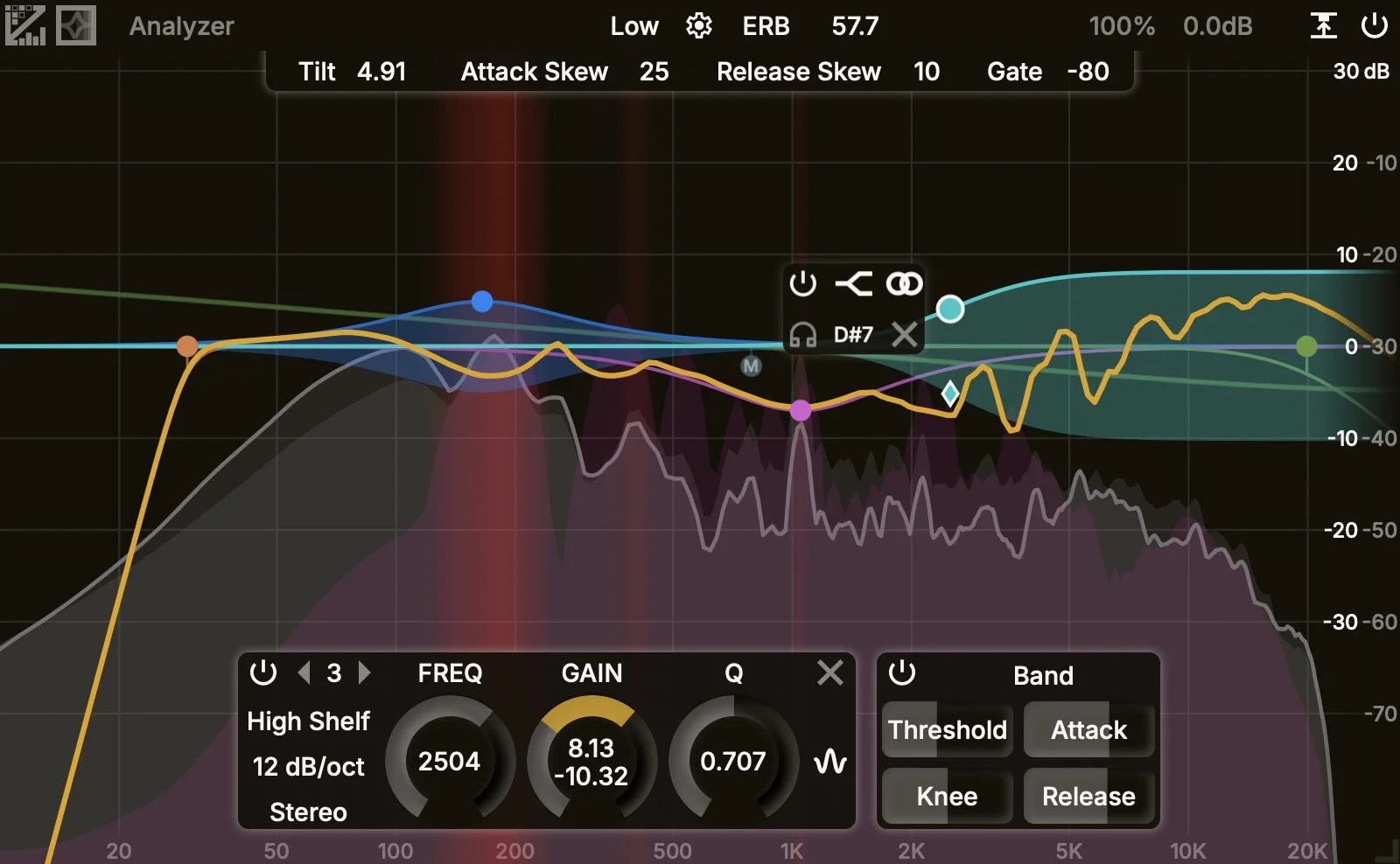
- FFT-domain dynamic processing adjusts gain per frequency bin, which gives it a finer resonance-control workflow than a conventional wide-band dynamic EQ trigger.
- Up to 24 linear-phase frequency bands can be shaped with Peak, Low Shelf, Low Pass, High Shelf, High Pass, Notch, Band Pass, Tilt Shelf, and Flat Tilt filters.
- Stereo, Left, Right, Mid, and Side placements let users target full mixes, individual channels, or stereo-field components from the same graph.
- Absolute, Band, and Relative dynamic modes change how each band's threshold is calculated for static, band-aware, or total-loudness-aware behavior.
- Spectrum Resolution settings trade latency for precision, ranging from low-latency tracking-friendly modes to very high-resolution spectral cleanup.
- Side-chain smoothing, tilt, attack skew, release skew, gate, and external side-chain support provide detailed control over what drives the dynamic response.
- Analyzer tools include pre/post/side views, collision detection, FFT freezing, spectrum display smoothing, color customization, UI scaling, and adjustable control behavior.
Description
ZL Spectrum Equalizer is a dynamic spectrum equalizer from ZL Audio that combines graph-based EQ bands with FFT-domain dynamic processing. Instead of only triggering broad dynamic curves from a full-band detector, it splits audio into frequency bins and lets matching side-chain bins move the gain inside each active filter range.
That makes it useful for resonance control, transparent spectral balancing, and detailed mix cleanup where a normal dynamic EQ can feel too coarse. The manual lists up to 24 linear-phase bands, nine filter types, five stereo placements, seven slopes, interactive analyzer views, collision detection, FFT freezing, and custom UI behavior.
The deeper controls are centered on Spectrum Resolution and Spectrum Dynamic behavior. Lower resolutions reduce latency and react faster, while higher resolutions trade latency and CPU headroom for narrower low-frequency precision; Absolute, Band, and Relative modes change how thresholds are calculated.
The first public release is version 0.0.1 for Windows, macOS, and Linux, distributed through public GitHub assets under the AGPLv3 license. ZL Audio frames it as early software, so it is best treated as a powerful but young spectral processor that should be tested carefully before use in critical sessions.
Video Preview

Frequently Asked Questions
How is ZL Spectrum Equalizer different from ZL Equalizer 2?
The official manual says ZL Spectrum Equalizer works directly in the frequency domain with FFT bins, while ZL Equalizer 2 applies broader filter curves driven by wide-band triggers. In practice, this makes ZL Spectrum Equalizer more focused on narrow spectral movement and resonance-style control.
What does the Spectrum Resolution control affect?
Spectrum Resolution changes the FFT frame size used for analysis and dynamic processing. Lower settings react faster and add less latency, while higher settings give finer frequency precision and can reach much higher latency.
Which dynamic modes are available?
The manual lists Absolute, Band, and Relative modes. Absolute uses a static threshold, Band relates the threshold to band side-chain loudness, and Relative relates it to total side-chain loudness.
Is version 0.0.1 production-ready?
It is a public release, but GitHub marks the 0.0.1 release as prerelease and the BPB article notes that bugs may still be expected. Users should test it in an empty session before relying on it in important projects.


