
SunBurnt
Key Features
- Draw multiple time-based curves to reshape a reverb tail instead of relying on a fixed room algorithm
- Create reverse, gated, panned, filtered, and pitch-rising reverb movements from the same convolution engine
- Reduce density for more fractured, textural results when a smooth reverb wash feels too polite
- Turn density all the way down to use the processor as a multi-tap delay
- Sync the length control to project tempo by holding Ctrl while dragging it
- Run the 64-bit plug-in in VST3, Audio Unit, or CLAP hosts on Windows, macOS, and Linux
Description
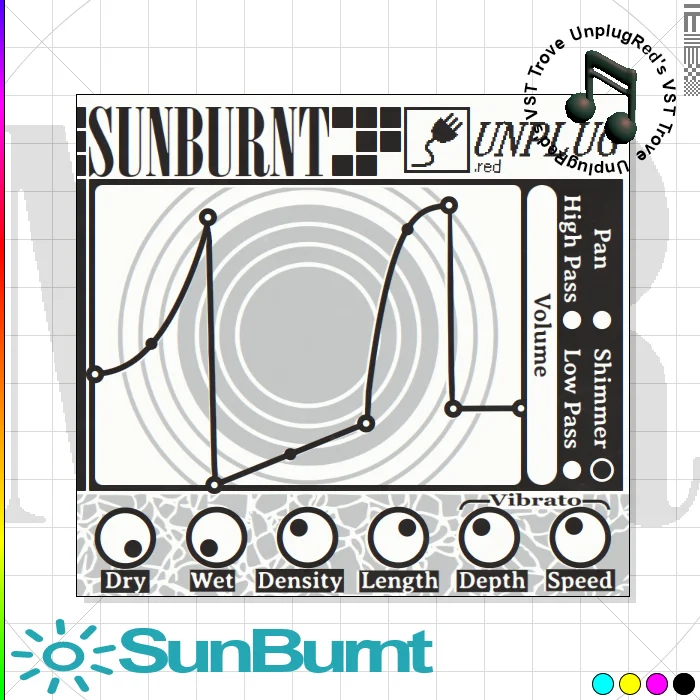
SunBurnt is a creative convolution reverb and delay effect from UnplugRed that lets you draw curves to shape the reverb tail over time. Rather than selecting a conventional room and adjusting a few knobs, you can use those curves to make a tail reverse, move across the stereo field, sweep filtering, or rise into a pitched shimmer.
The plugin is especially suited to textural effects, because reducing its density moves it away from a smooth wash and toward more chaotic, broken-up results. Turning density all the way down changes the behavior into multi-tap delay mode, giving sound designers a second way to build rhythmic space from the same interface.
SunBurnt can also be tempo-synced by holding Ctrl while adjusting its length control, which makes deliberate reverb-and-delay gestures easier to place in a track. Its convolution processing is relatively demanding, so larger audio buffers are the sensible starting point if a busy session starts to strain.
UnplugRed offers the full free version through its dedicated creator-controlled download page, with a non-intrusive visual banner; the paid Patreon option removes that banner. Current builds support 64-bit VST3, Audio Unit, and CLAP hosts on Windows, macOS, and Linux.
Frequently Asked Questions
What makes SunBurnt different from a normal reverb?
SunBurnt generates its convolution impulse inside the plug-in and lets you draw curves that change the tail over time. That approach supports movements such as reverse reverb, changing pan, filtering, and pitch changes rather than just choosing a room preset.
Can SunBurnt work as a delay?
Yes. UnplugRed says that turning the Density control all the way down switches the plug-in into multi-tap delay mode. It is useful when you want rhythmic repeats with the same curve-based sound-design approach.
Why does SunBurnt use a lot of CPU?
The developer attributes the heavier load to its extensive convolution processing. If it causes problems in a session, UnplugRed recommends increasing the audio buffer size.
What is different about the paid version?
The public free-version post says the free build includes a non-intrusive banner. KVR's release coverage says the paid Patreon option removes that banner while supporting the developer.


