
Polarity-MD
Key Features
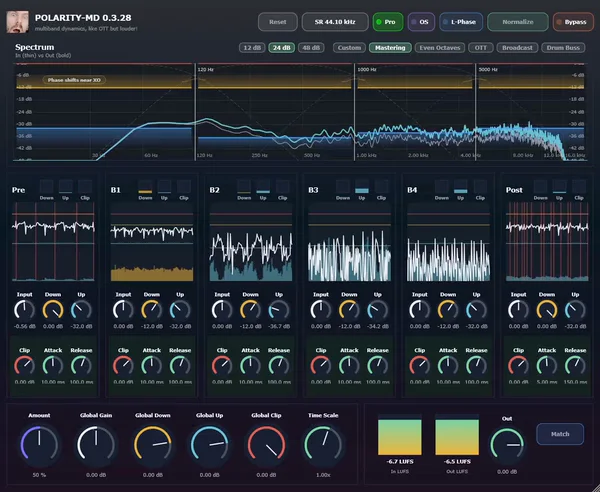
- Four-band OTT-style engine with simultaneous upward and downward compression on each processing stage.
- Analyzer-driven crossover editing with draggable split markers, named presets, auto crossover analysis, and 12, 24, or 48 dB slope choices.
- Pre, B1-B4, and Post stage layout gives you broadband input control, per-band shaping, and final bus dynamics in one chain.
- Per-stage clipping, clip-delta monitoring, stage solo, and color-coded feedback make it easier to hear exactly what each band is removing.
- Built-in LUFS metering, normalize, match, oversampling, and linear phase options support fairer A/B checks and cleaner heavy processing.
- Native JUCE editor runs without a separate UI runtime layer and ships for Windows, macOS, and Linux.
Description
Polarity-MD is a native four-band multiband dynamics processor from Polarity, built for OTT-style upward and downward compression with more control than the usual three-band workflow. It combines draggable analyzer-based crossovers, per-stage clipping, pre and post dynamics, LUFS metering, oversampling, linear phase mode, and match-level tools in one focused plugin.
The workflow is organized around Pre, B1-B4, and Post stages, so you can shape broadband input dynamics before the split, work each frequency band, then finish the chain with post compression and clipping. Global Amount, Down, Up, Clip, Gain, and Time Scale macros make it quick to push a drum bus, synth stack, or master chain without rebuilding every band by hand.
Compared with basic OTT clones, Polarity-MD puts more emphasis on visibility and control. BPB highlighted the four-band design, custom Linkwitz-Riley crossover frequencies, color-coded compression and clipping feedback, LUFS metering, and clip-delta monitoring as the details that make it feel more refined than a blunt loudness tool.
Use it when you want aggressive density, punch, and loudness shaping, but still need to see where the split points sit and hear what each clipper removes. The current native JUCE build is available for Windows, macOS, and Linux, with VST3 and CLAP on all three platforms plus AU on macOS.
Video Preview


Frequently Asked Questions
How is Polarity-MD different from a basic OTT clone?
Polarity-MD uses four bands instead of the common three-band OTT layout, and it adds analyzer-based crossover editing, per-stage clipping, LUFS metering, clip-delta monitoring, and global macros. That makes it better suited to controlled loudness shaping than a simple set-and-forget OTT effect.
Can Polarity-MD do both upward and downward compression?
Yes. The official page lists upward and downward compression on its stages, with Global Down and Global Up macros for rebalancing the whole processor quickly. This is central to the OTT-style workflow, where quiet details can be lifted while peaks are also controlled.
What formats are included in the current build?
The official page lists VST3 and CLAP for Windows, macOS, and Linux, plus AU on macOS. The downloaded v0.3.8 ZIPs also include standalone builds for each platform, but the plugin-page formats are VST3, CLAP, and AU.
Does the macOS build need any special handling?
Yes. The official page notes that Polarity-MD is currently unsigned on macOS, so Gatekeeper may block it on first launch. The developer provides a macOS install guide for opening or approving the plugin through System Settings, right-click Open, or Terminal.


