
Orra Tone Zone
Key Features
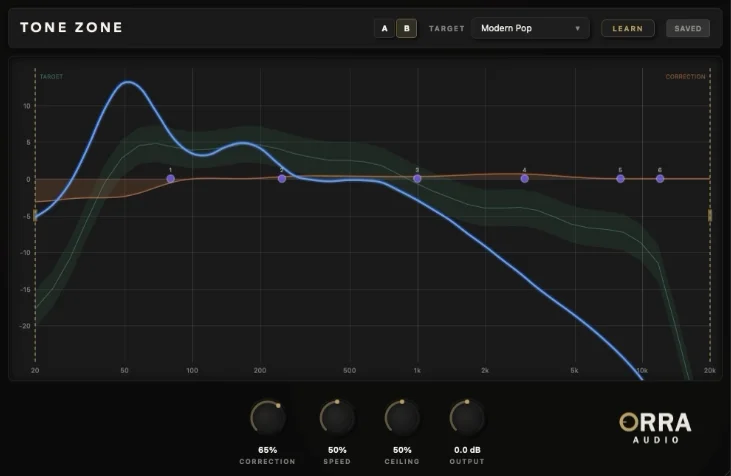
- 40-band spectral analysis displays your mix against 24 genre-calibrated targets, so tonal problems are obvious before you start tweaking
- Adaptive FFT correction continuously nudges the spectrum toward the target while density gating and section-aware ducking keep it from reacting too aggressively
- Custom reference-track capture lets you build reusable .otzcurve targets from WAV, AIFF, MP3, or FLAC masters instead of relying only on factory presets
- 6-band parametric EQ is layered directly on top of the analyzer, making it easy to turn the orange correction suggestion into deliberate manual moves
- Each EQ band can switch into Tube, VCA, or British saturation, adding harmonic color at specific frequencies without changing the overall level
- A/B comparison plus draggable range handles make it practical to compare decisions quickly and limit correction to only the parts of the spectrum that still need work
Description
Orra Tone Zone is a tonal curve correction plugin for macOS and Windows that combines referencing, corrective EQ, and harmonic shaping in one window. Instead of only showing whether a mix is bright or dull, it overlays a 40-band spectrum against 24 genre targets and lets you push the curve toward the zone with an adaptive correction engine.
The auto section is built for broad, musical moves rather than blunt boosts. Correction cuts run at full strength while boosts are intentionally limited, and the range handles let you confine the process to only the frequencies that still need help.
Once the orange correction curve reveals the problem areas, you can take over with a 6-band parametric EQ that sits directly on the analyzer. Each band can also switch into Tube, VCA, or British saturation, so you can add color at specific frequencies without opening another plugin.
Tone Zone also learns custom targets from reference tracks and stores them as reusable curves, which makes it useful for matching a recurring client sound or checking mixes against favorite masters. Orra distributes it as a permanent free/pay-what-you-can release with a lifetime license, and the developer says the plugin runs at about 93 ms of latency with DAW compensation handling the delay.
Video Preview

Frequently Asked Questions
Can Tone Zone learn targets from my own reference tracks?
Yes. Tone Zone can analyze WAV, AIFF, MP3, and FLAC files, then save the resulting tonal fingerprints as reusable .otzcurve targets. That makes it useful when you want to match a recurring client sound or build your own private target library.
Does the correction engine replace manual EQ work?
Not really. Orra and the launch coverage both position the orange correction curve as a diagnostic guide: push the correction hard to see what the engine wants, then use the 6-band EQ to make the important choices yourself. After that, back the automatic section down for lighter ongoing maintenance.
Can I limit the automatic correction to only part of the spectrum?
Yes. Tone Zone has range handles on the left and right edges of the analyzer so you can restrict processing to a chosen frequency span. That is useful if your low end is already dialed in and you only want the plugin watching the mids and highs.
Does Tone Zone add latency on the master bus?
Yes. Orra states that Tone Zone runs at about 93 ms of latency, with normal DAW plugin delay compensation expected to handle the offset. It is therefore better suited to mix-bus and mastering work than live input monitoring.
Is Tone Zone a restricted demo or a permanent license?
It is a permanent free/pay-what-you-can release rather than a timed trial. Orra describes it as a lifetime license with no demo limitations or trial period.


