
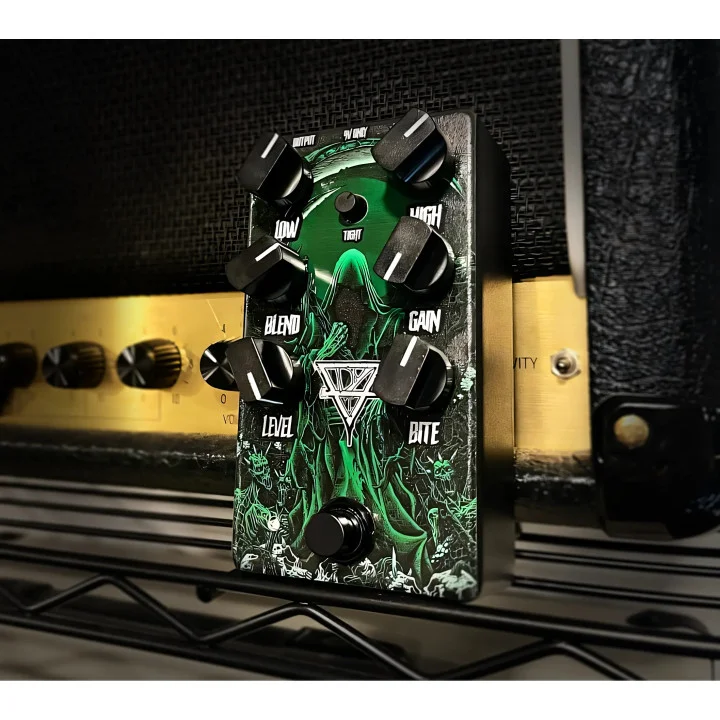
GRIM3
Key Features
- Moves from a transparent clean boost to saturated overdrive for front-end gain staging before an amp or amp simulation.
- Tightens pre-gain low end to reduce boom before heavier guitar processing.
- Includes Low and High EQ controls for shaping weight and edge around the drive stage.
- Uses Bite to add focused midrange presence when a riff needs more definition.
- Blends dry attack with driven weight so aggressive settings can retain articulation.
- Provides current private installers for macOS, Windows, and Linux after licence claim.
Description
GRIM3 is Aurora DSP's overdrive plug-in for tightening a guitar or bass signal before it reaches an amp or amp simulation. It can work as a transparent clean boost, a focused midrange push, or a more saturated drive while retaining dry attack through its Blend control.
Low and High EQ controls shape the weight and edge around the drive stage, so you can remove excess boom before a high-gain amp or bring more definition to a dense guitar layer. The Bite control adds focused midrange presence when riffs need to cut without relying on a separate pedal.
That makes GRIM3 most useful at the front of a virtual guitar chain, where modest gain and low-end control can make palm-muted parts feel tighter and more articulate. Pushing the drive and blend settings further also gives bass layers or rhythm guitars a more pronounced, saturated character.
Aurora DSP supplies current installers for macOS, Windows, and Linux after a user claims the lifetime $0 licence through an Aurora DSP account. The official page lists version 0.9.0 builds and platform-specific formats, including AU, VST3, and AAX on macOS, VST3 and AAX on Windows, and VST3, LV2, and CLAP on Linux.
Frequently Asked Questions
What does GRIM3 do?
GRIM3 is an overdrive effect designed to sit before an amp or amp simulation. Aurora DSP describes its range as a transparent clean boost through saturated drive, with controls for low end, high end, attack, and focused bite.
Can GRIM3 help tighten a high-gain guitar tone?
Yes. The official page specifically identifies pre-gain low-end tightening as a use case, so you can remove boom before the signal reaches the amp stage. Low EQ, High EQ, and Bite then provide additional tone shaping around the drive.
Do I need an Aurora DSP account to download GRIM3?
Yes. Aurora DSP requires you to log in or create an account, then claim a zero-value order for the lifetime licence. That account provides access to the private installers and handles initial licence activation.
Which plugin formats does GRIM3 provide?
Aurora DSP lists AU, VST3, AAX, and standalone where supplied for macOS; VST3, AAX, and standalone where supplied for Windows; and VST3, LV2, CLAP, and standalone for Linux. The specific installer availability is managed in the Aurora DSP account area.


