

Key Features
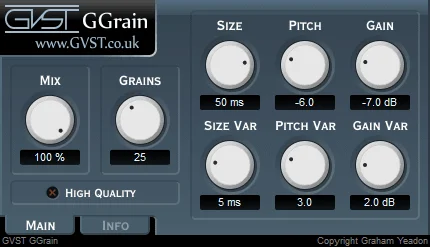
- Granular resynthesis turns incoming audio into overlapping fragments while retaining elements of the original sound
- Adjustable grain count moves the texture from sparse and grainy to fuller and denser
- Grain size and random size variation shape the length and irregularity of each fragment
- Pitch and pitch variation alter playback speed across grains, with transposition up or down an octave
- Gain and gain variation introduce level changes between individual grains
- Wet/dry mix and optional high-quality interpolation let you balance the result and processing load
Description
GGrain by GVST is a granular resynthesis effect that takes small fragments of incoming audio, changes them, and reassembles them into a new signal. Its random grain selection can add lo-fi movement while retaining some of the character of the source.
The Grains control sets how many fragments can play at once, moving from sparse, grainy results toward a denser texture. Size and SizeVar set the base grain length and its random variation, so the resulting texture can change from grain to grain.
Pitch and Gain each have their own variation control, allowing playback speed and level to shift across the individual grains. Pitch can be moved up or down by an octave, and the Mix control blends the processed signal with the original.
A High Quality switch improves interpolation and uses filtering to reduce aliasing, but it also increases CPU use. GVST cautions that the effect can be demanding and suggests offline processing; reducing the grain count is another way to manage the load.
The developer suggests experimenting with vocals and provides starter presets. Producers seeking subtle movement or more abstract textures can use the wet/dry balance to bring the processed layer into an existing arrangement.
Frequently Asked Questions
Does GGrain generate sound on its own?
GGrain is an audio effect that works on incoming sound. Insert it on a track or bus with audio playing through it.
How can I reduce GGrain’s CPU use?
The developer notes that more grains require more processing power and that High Quality mode uses considerably more CPU. Reduce the grain count or turn that mode off, and consider offline processing for demanding settings.
What do the variation controls change?
SizeVar, PitchVar, and GainVar add random variation around their respective base settings for each grain. This lets individual fragments differ in length, playback pitch, and volume.


