
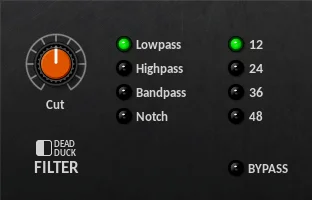
DD Filter
Key Features
- Four filter responses cover low-pass, high-pass, band-pass, and band-stop notch shaping.
- Selectable 12, 24, 36, and 48 dB/octave slopes make it useful for gentle tonal moves or steep cleanup cuts.
- Full-range cutoff control runs from 10 Hz to 20 kHz for broad mix filtering duties.
- Simple control set keeps the workflow fast when you only need cutoff, mode, and slope decisions.
- Common Dead Duck effects behavior includes soft bypass and file-based preset saving through the shared system menu.
- Windows 32-bit and 64-bit VST2 support keeps it usable in older and newer compatible Windows DAW sessions.
- Tiny standalone DLL format makes it easy to install only the filter from the larger Free Effects bundle.
Description
DD Filter is a Windows VST filter from Dead Duck Software's Free Effects collection. It focuses on direct tone shaping with low-pass, high-pass, band-pass, and notch modes, plus selectable slopes from gentle 12 dB/octave curves through steep 48 dB/octave cuts.
The plugin is built for quick cleanup and simple creative filtering rather than animated modulation or analog-modelled drive. Its cutoff range spans 10 Hz to 20 kHz, so it can handle broad low-end trimming, top-end rolloff, telephone-style band limiting, and narrow problem-frequency rejection.
DD Filter makes the most sense when you want a lightweight, no-friction utility filter that stays out of the way. User comments around the plugin point to practical uses such as removing harsh high frequencies from amp-sim guitars and replacing older 32-bit steep-filter tools in 64-bit Windows sessions.
Because it is part of the Dead Duck Free Effects bundle, DD Filter shares the bundle's simple DLL installation and common control behavior. Treat it as a fast technical filter for Windows VST2 hosts, not as a resonance-heavy synthesizer filter, auto-wah, or modulation effect.
Frequently Asked Questions
How is DD Filter different from Dead Duck AutoFilter?
DD Filter is the static filter in the Free Effects bundle, with cutoff, filter type, and slope controls. AutoFilter adds resonance and an LFO modulator for moving filter sweeps.
Can DD Filter make very steep cuts?
Yes. The developer documentation lists selectable slopes from 12 to 48 dB/octave, which makes it suitable for sharper high-pass, low-pass, band-pass, or notch filtering than a basic one-slope filter.
Does DD Filter add resonance or drive?
The official Filter section lists cutoff, filter selector, and slope selector controls only. For resonance inside the same bundle, the developer documents AutoFilter and DualFilter as separate filter plugins.
Is DD Filter installed as a standalone plugin?
The Dead Duck Free Effects are supplied as individual Windows DLL files. You can copy the required DLLs into a VST2 plugin folder recognized by your DAW.


