
Cyanide 2.0
Key Features
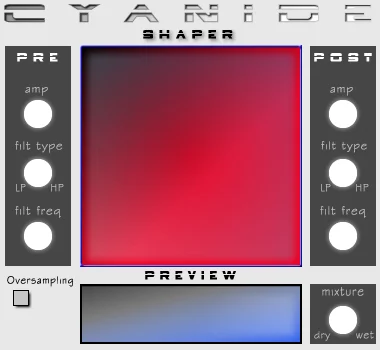
- Draws a custom spline transfer curve so distortion character can be shaped visually instead of chosen from fixed drive modes.
- Lets you add, reposition, and remove curve points for asymmetric clipping, severe bends, and other experimental nonlinear effects.
- Provides separate pre- and post-gain stages to control how strongly the source hits the shaper and how the processed level leaves it.
- Places switchable low-pass or high-pass filters before and after the waveshaping stage for targeted tone sculpting.
- Includes a wet/dry mixture control for blending distorted detail back with the original signal.
- The current Cyanide2 rebuild is distributed in developer-published macOS, Windows, and Linux bundles with AU, VST3, LV2, and standalone targets.
Description
Cyanide 2.0 is Smart Electronix's graphic waveshaper effect for bending an audio signal into anything from a mild harmonic edge to deliberately hostile distortion. Its central spline display lets you draw the transfer curve directly, while independent pre- and post-processing controls help you decide what reaches the shaper and how the result is filtered afterward.
The current developer-maintained project calls the rebuilt plug-in Cyanide2, retaining that compact shaper-led workflow while publishing modern pre-built macOS, Windows, and Linux bundles. Rather than picking a distortion model from a menu, you can add, move, and remove points on the curve, making it suited to unusual clipping contours, asymmetric color, and sound-design experiments.
Cyanide's pre and post sections each provide gain plus switchable low-pass or high-pass filtering, so the incoming material can be narrowed before distortion and cleaned up afterward. A wet/dry control keeps parallel-style blending straightforward, and the current project documents oversampling as part of Cyanide2's signal path.
The maintained GitHub release is a complete Smart Electronix bundle, not a single-product installer: download the archive for your operating system and select Cyanide2 from its included plug-ins. It is a developer-controlled GPL release with no checkout or limited-time claim.
Frequently Asked Questions
What is Cyanide 2.0 used for?
Cyanide is a waveshaping distortion effect. You draw a transfer curve that remaps the incoming waveform, allowing anything from subtle harmonic coloration to aggressive, nonstandard distortion shapes.
How is Cyanide2 different from a typical distortion plug-in?
Instead of relying only on named distortion algorithms, Cyanide centers its workflow on a graphical spline curve that you edit directly. Its pre- and post-filters also let you constrain the material before shaping and refine the tone afterward.
What is included in the current official download?
The maintained Smartelectronix release is an operating-system-specific archive containing the developer's plug-in collection, including Cyanide2. It is not a Cyanide-only installer, so users select the Cyanide2 plug-in from the bundle after downloading the macOS, Windows, or Linux release.
Does the maintained Cyanide2 build support current plug-in formats?
The official Cyanide2 project is configured to build AU, VST3, LV2, and standalone versions. The project README states that pre-built bundles are published for macOS, Windows, and Linux.


