
BXQ
Key Features
- Broad Baxandall low and high shelves for shaping overall tonal balance.
- Selectable shelf frequencies and stepped gain controls for repeatable adjustments.
- Left/right and mid/side processing for independent stereo or center-and-side adjustments.
- Link mode keeps channel controls together for matched stereo moves.
- Low-cut and high-cut filters trim frequency extremes.
- Independent output trims adjust levels after EQ.
- Switchable oversampling, touchscreen support, and a resizable interface.
Description
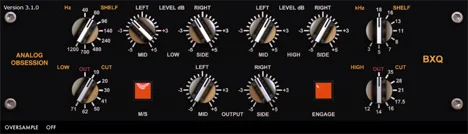
BXQ is a Baxandall-style equalizer from Analog Obsession for broad low and high frequency shaping. Its left/right and mid/side modes make it useful on individual tracks, stereo buses, and full mixes when you want to adjust overall tonal balance.
The low and high shelves each offer eight selectable frequencies and stepped boost or cut controls. Their broad curves suit gentle changes in weight and brightness; for narrow resonance removal, a separate parametric EQ will offer more focused control.
Switch to mid/side mode to adjust the center and sides separately, or link the channels when you want matching settings. Low-cut and high-cut filters provide further control over the frequency extremes, and independent output trims help set levels after processing.
The Analog Obsession label switches oversampling, while the BXQ label links the left and right controls. The interface can be resized from its lower-right corner and supports touchscreens, giving you options for different screens and working setups.
Version 5.0 is available for Windows and macOS in the formats listed below, including native Apple Silicon support. The developer's product post provides Mac and Windows installers and a Windows ZIP; check your host and graphics compatibility before installation.
Frequently Asked Questions
What is BXQ best suited for?
Its broad low and high shelves are suited to tonal balance on tracks, buses, and mixes. A parametric EQ is a better companion for narrow corrective cuts.
Can BXQ process the center and sides separately?
Yes. Enable M/S to adjust the mid and side signals independently, or link the channels when matching settings are useful.
How do I enable oversampling?
Click the Analog Obsession label on the interface to switch oversampling. The developer identifies this label as the oversampling control.
Which systems and plugin formats does BXQ support?
The developer lists VST3 and AAX for Windows, and VST3, AU, and AAX for macOS. The Mac version supports Intel and Apple Silicon and requires a Metal-compatible graphics card; Windows requires OpenGL.


